

STEP 1/5
Seat Layout
Problems
1.
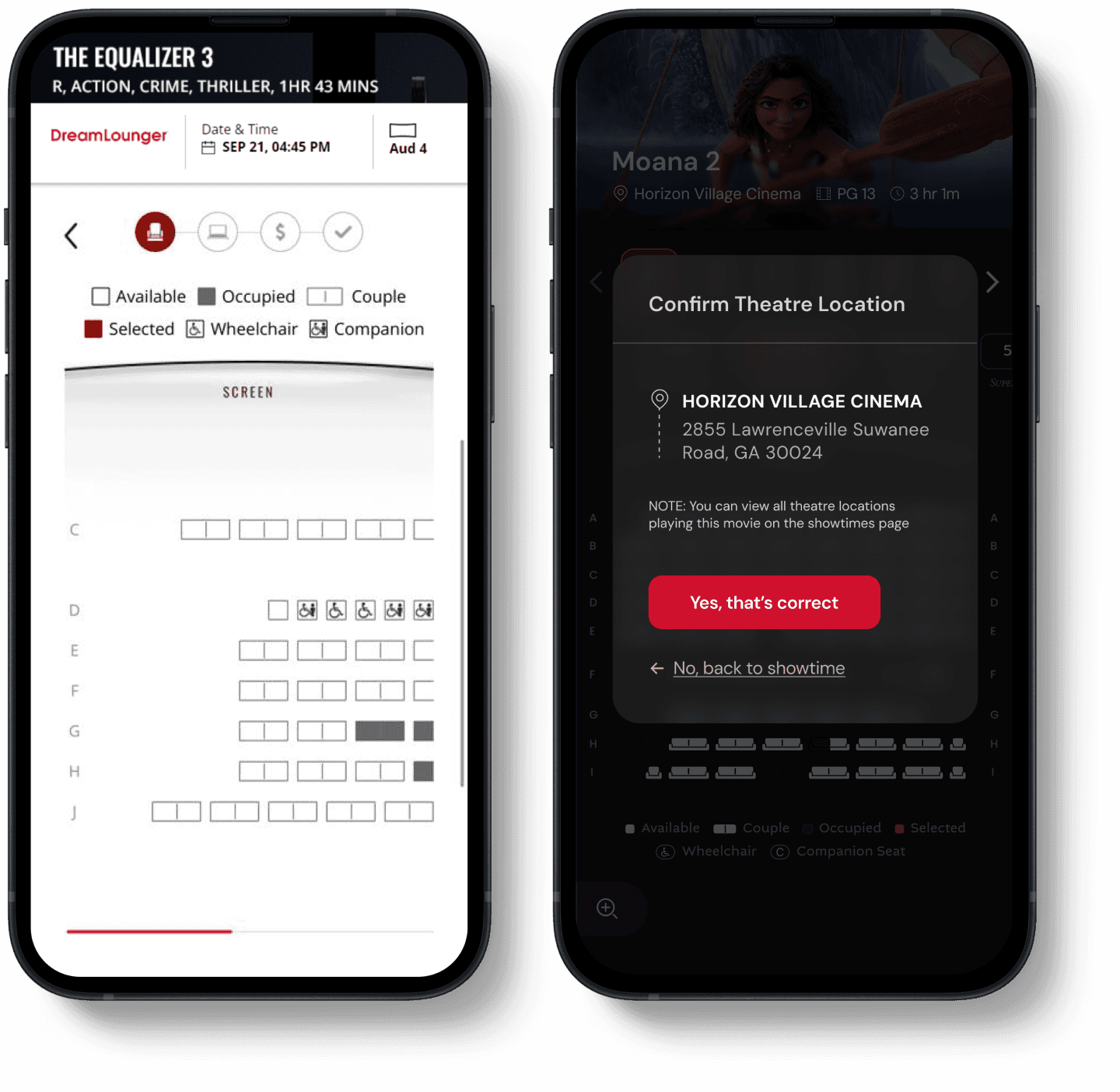
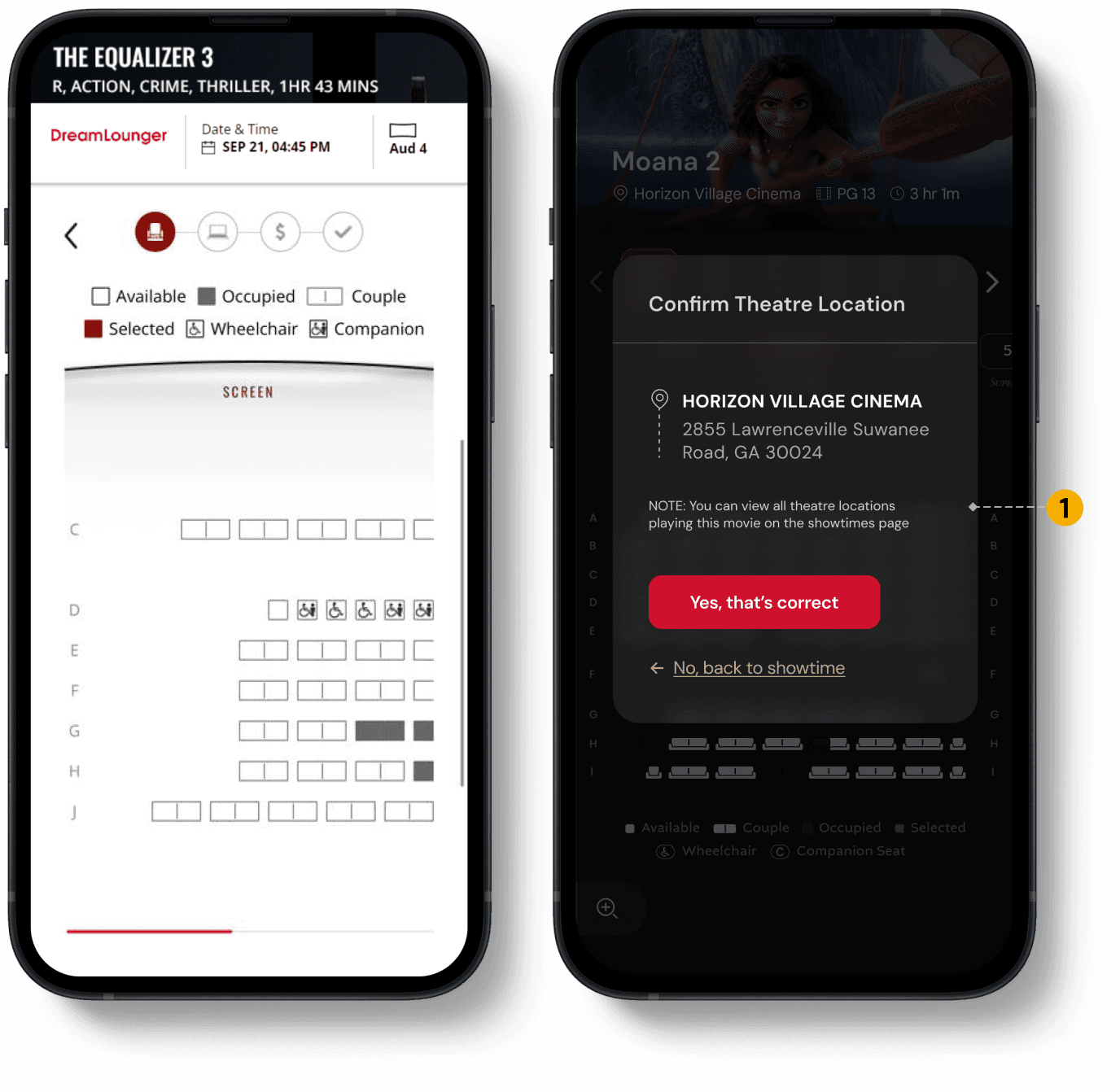
Users were showing up at the wrong location
Most users compare & select their showtimes from google search result and land on the seat layout directly (which did not have the location name specified)

Before
After
SOLUTION
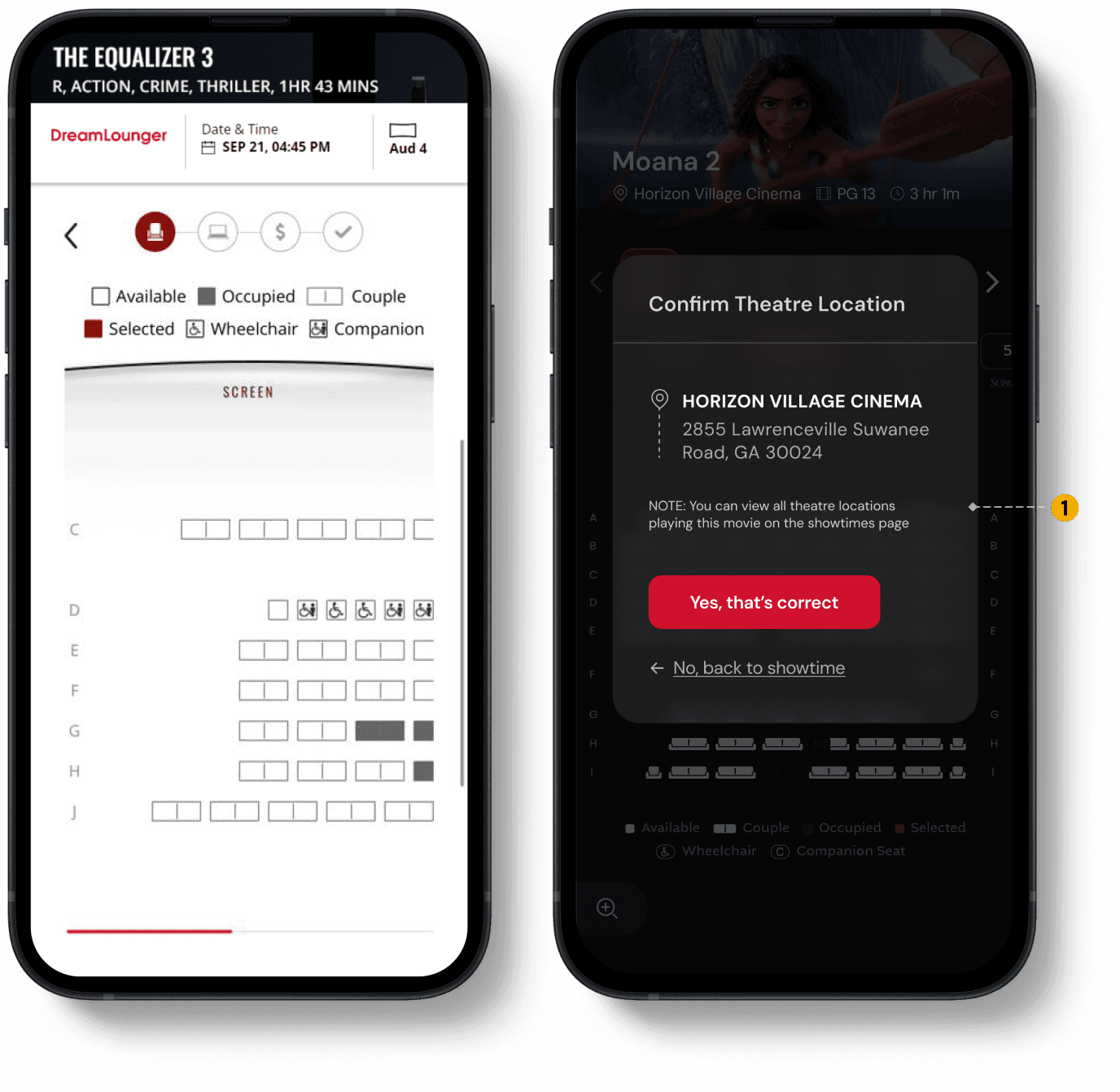
Confirm Theatre Location
If users arrive from a third-party site, they’re prompted to confirm the theatre location before viewing the seat layout.
Problems
1.
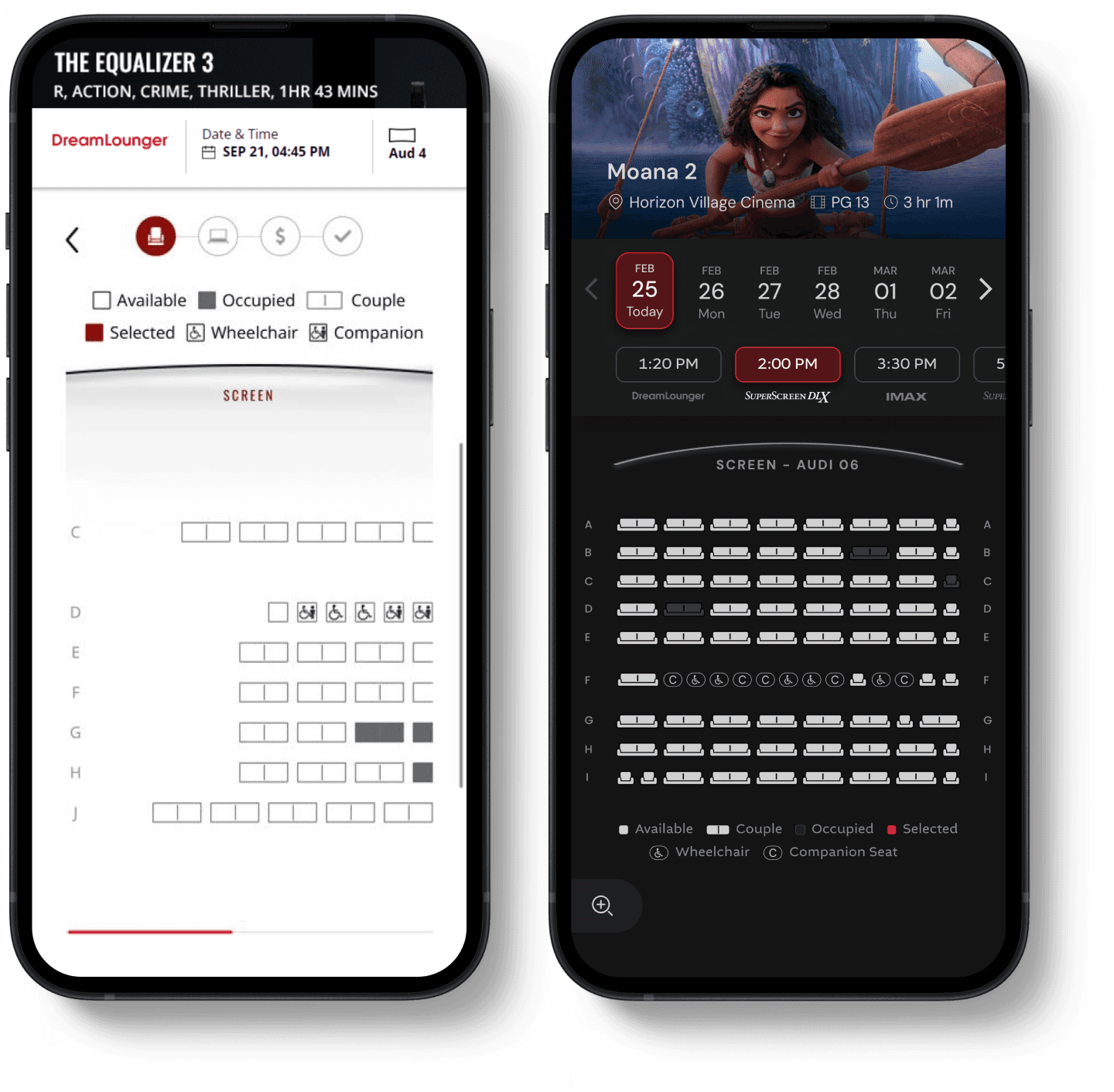
Missing theatre name
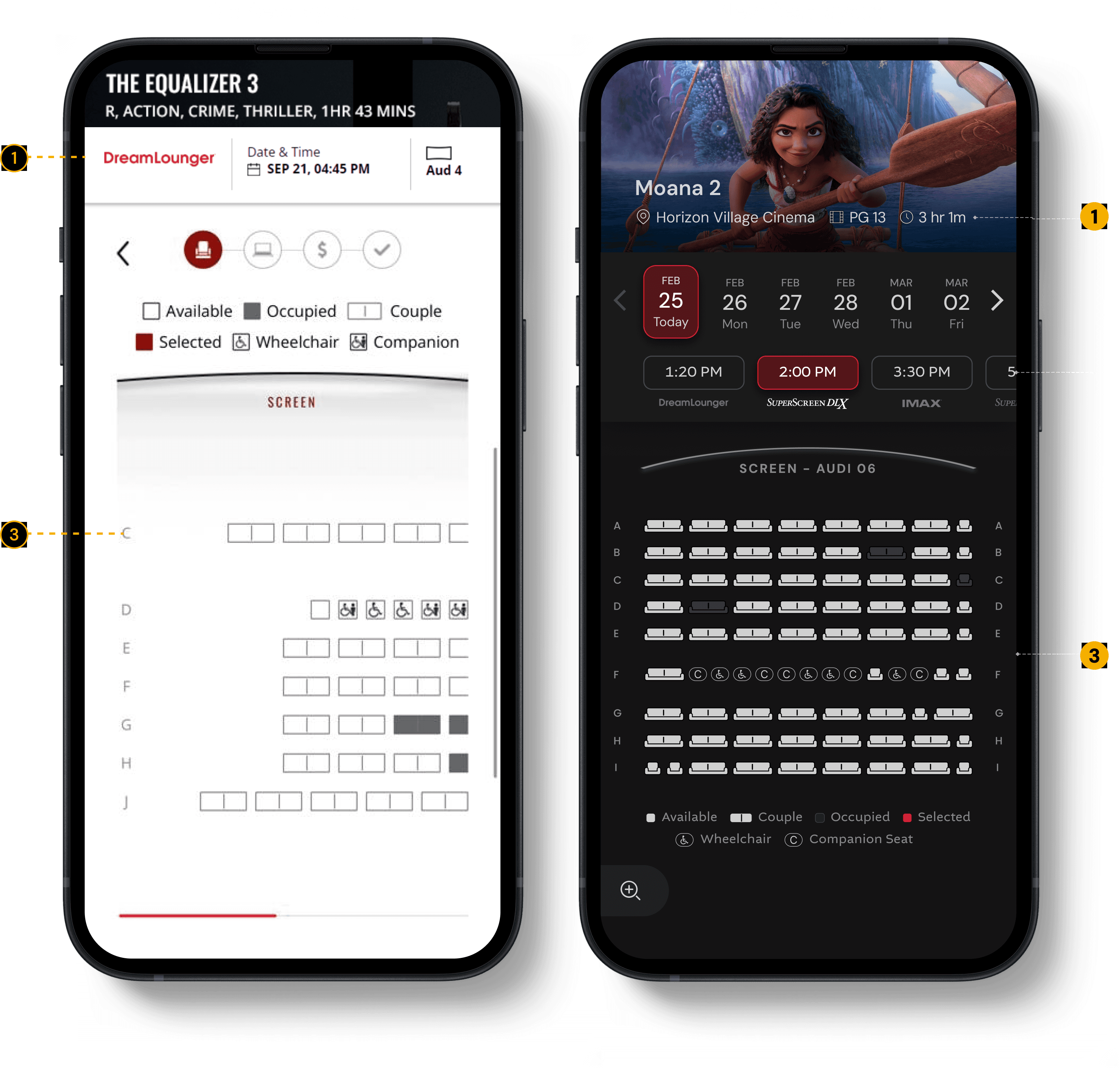
The seat selection page didn’t show which theatre the user was booking for, leading to accidental bookings for the wrong location.
2.
No quick way to switch showtimes
If preferred seats were sold out, users couldn’t change the date or showtime from the seat map and had to go back to the showtimes page.
3.
Row numbers disappeared while scrolling
When users scrolled the seat layout, row labels got hidden, making seat selection harder and more error-prone.
Before
After




SOLUTION
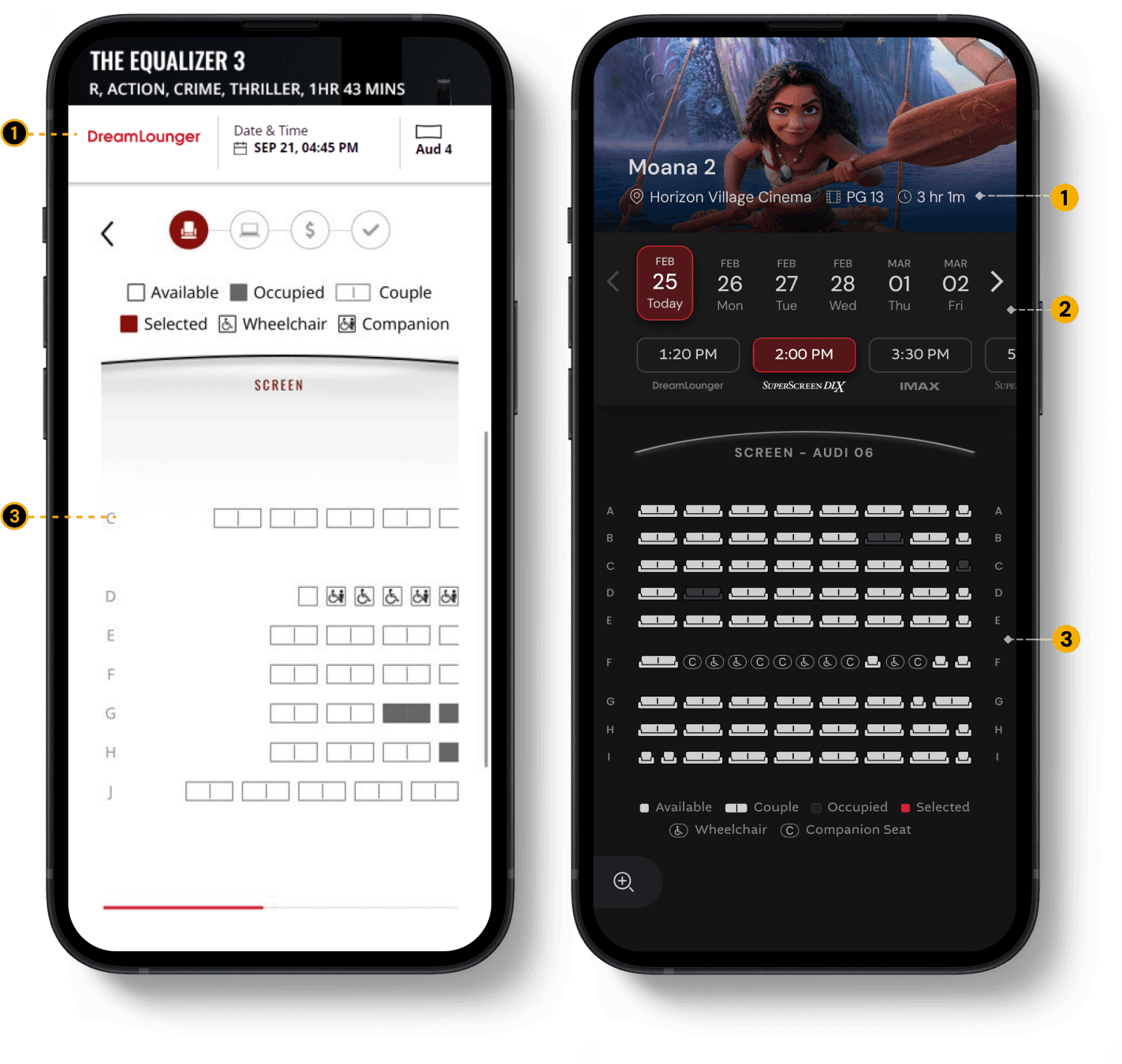
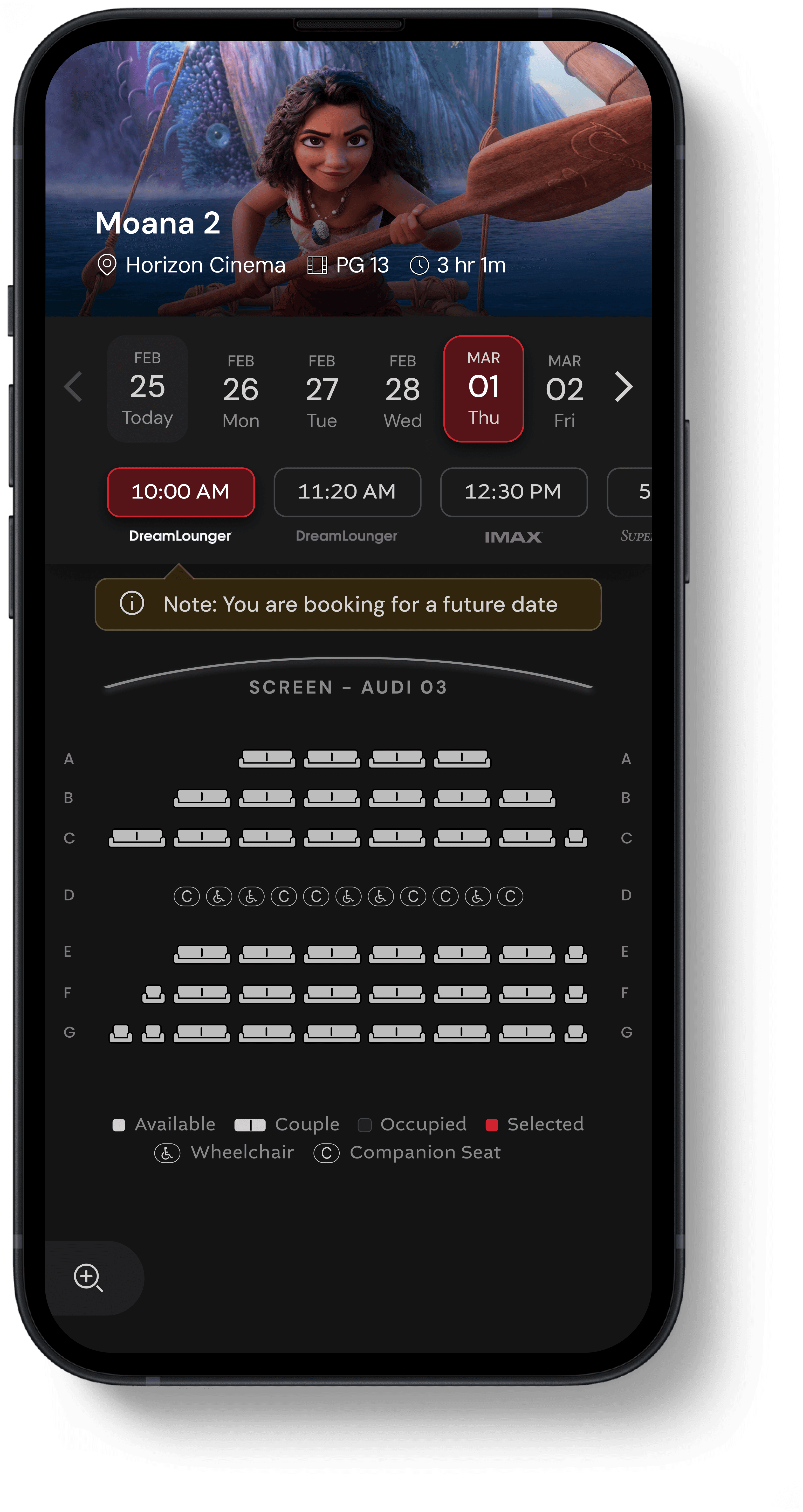
Theatre Name Specified
The theatre name is displayed alongside the movie details, making it easy for users to quickly confirm the location.

Change Date & Showtime
Users can browse and switch dates & showtimes across different experience formats, such as IMAX and 4DX.
Zoomed-Out Seat Layout
Viewing the full seat layout at a zoomed-out level helps users quickly decide where they want to sit in the theatre.
Problems
1.
No direct way to edit ticket types
To change a ticket type, users had to unselect and reselect their seats.
2.
“Apply to all” was hard to undo
Once enabled, users had no clear way to revert it. Users had to trial-and-error by unselecting & reselecting seats just to reopen the ticket selection modal.
3.
Unclear age ranges for ticket types
Users couldn’t easily understand which age group each ticket type applied to.
4.
Low visibility of “Apply to all”
The feature wasn’t highlighted enough, despite it’s significance in reducing interaction cost (of repeat actions and effort)
New US Regulation - Fee transparency:
A new US regulation requires cinemas to show convenience fees upfront, along with the ticket price. Previously, this fee appeared only at checkout. At Marcus Theatres, only non-members have to pay this fee.
Before
After
SOLUTION

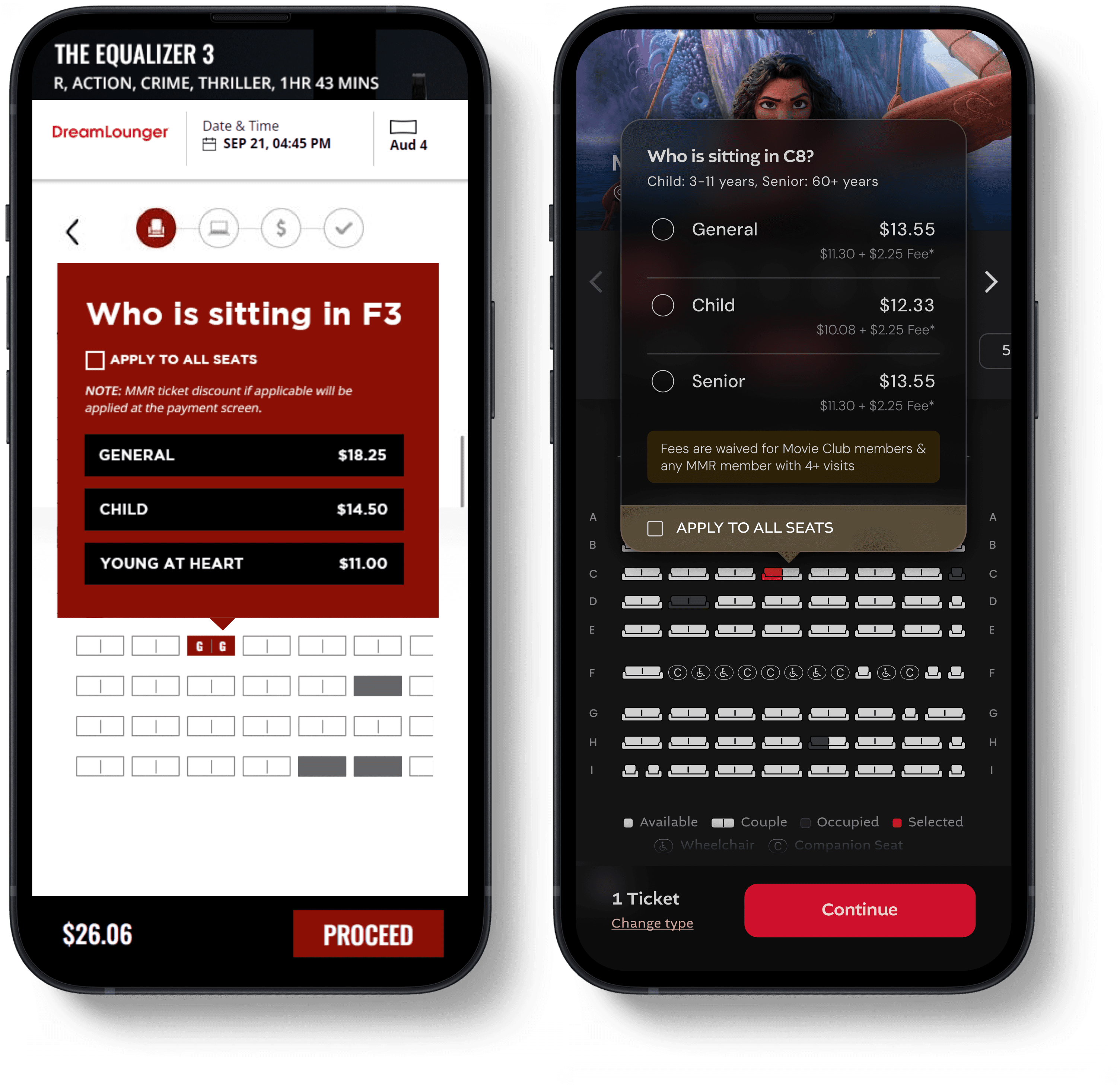
Reduced Friction in Ticket Editing
Previously, users had to unselect and reselect seats to change ticket types. Now, they can edit tickets directly.
Defined Age Groups
Clear range of age groups mentioned for special tickets

Highlighted “Apply to all seats”

Fee transparency & Waiver condition
Clear messaging reassures members that convenience fee is waived for them


4
Problems
1.
No Ticket Review or Easy Edits
There was no way for users to review all selected tickets, and changing a ticket type required unselecting and reselecting seats.
Before
After
SOLUTION
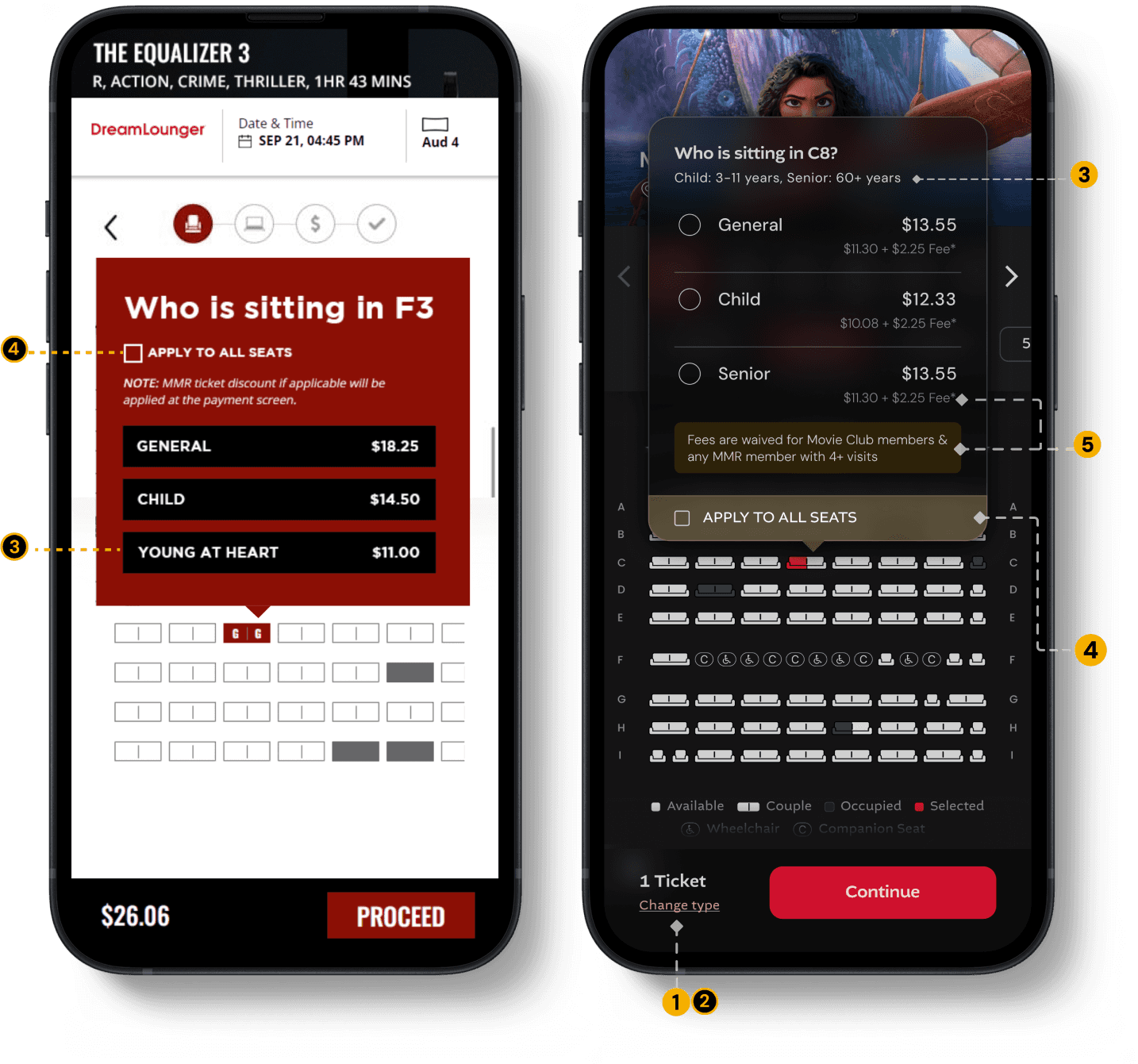
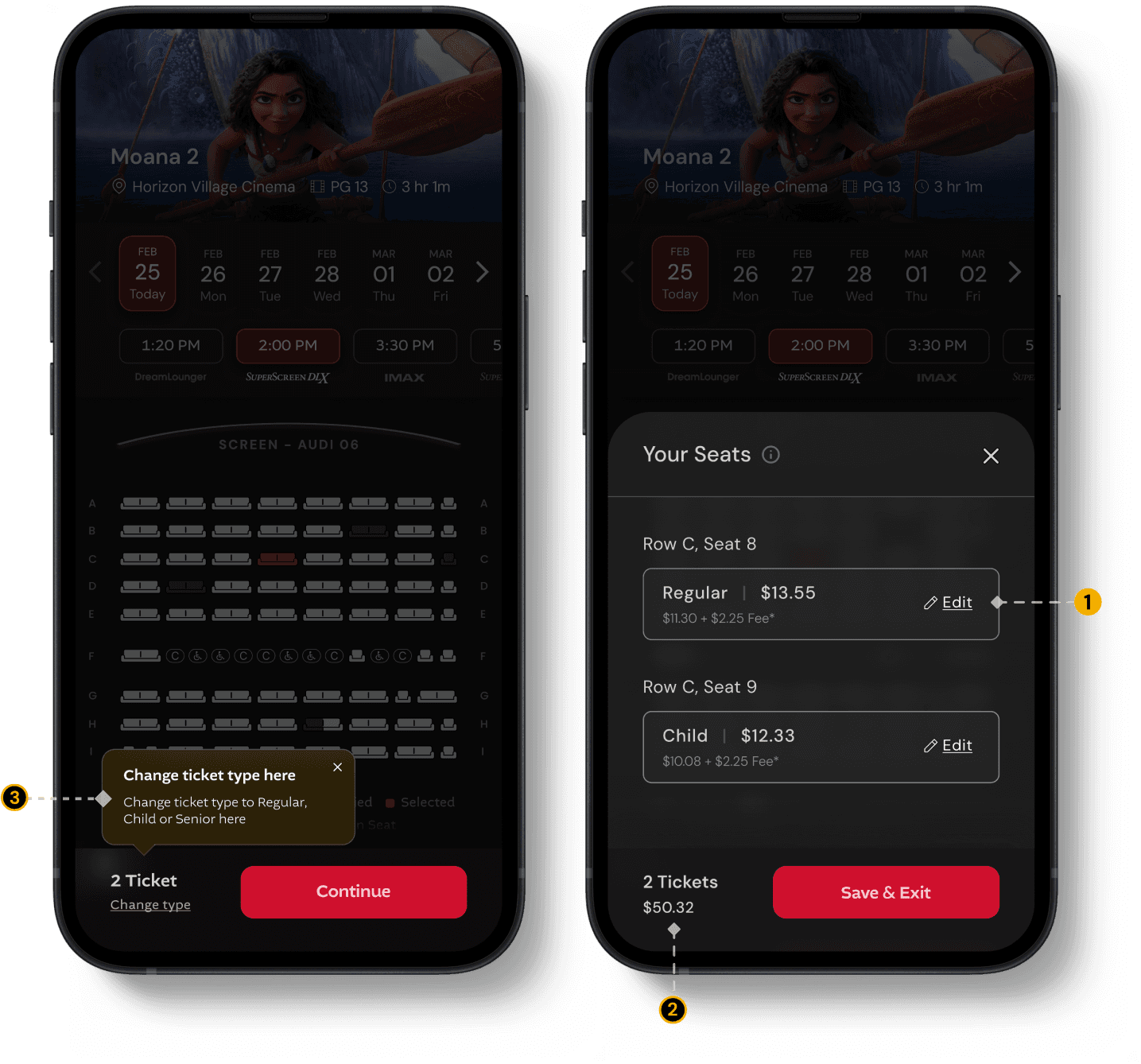
Edit tickets
Users can change ticket types directly from the drawer.
Ticket count & total cost
Users can see the number of tickets selected and the total cost upfront.

Feature discovery via tooltips
Temporary tooltips guide users and highlight the new ticket-editing feature.

Problems
1.
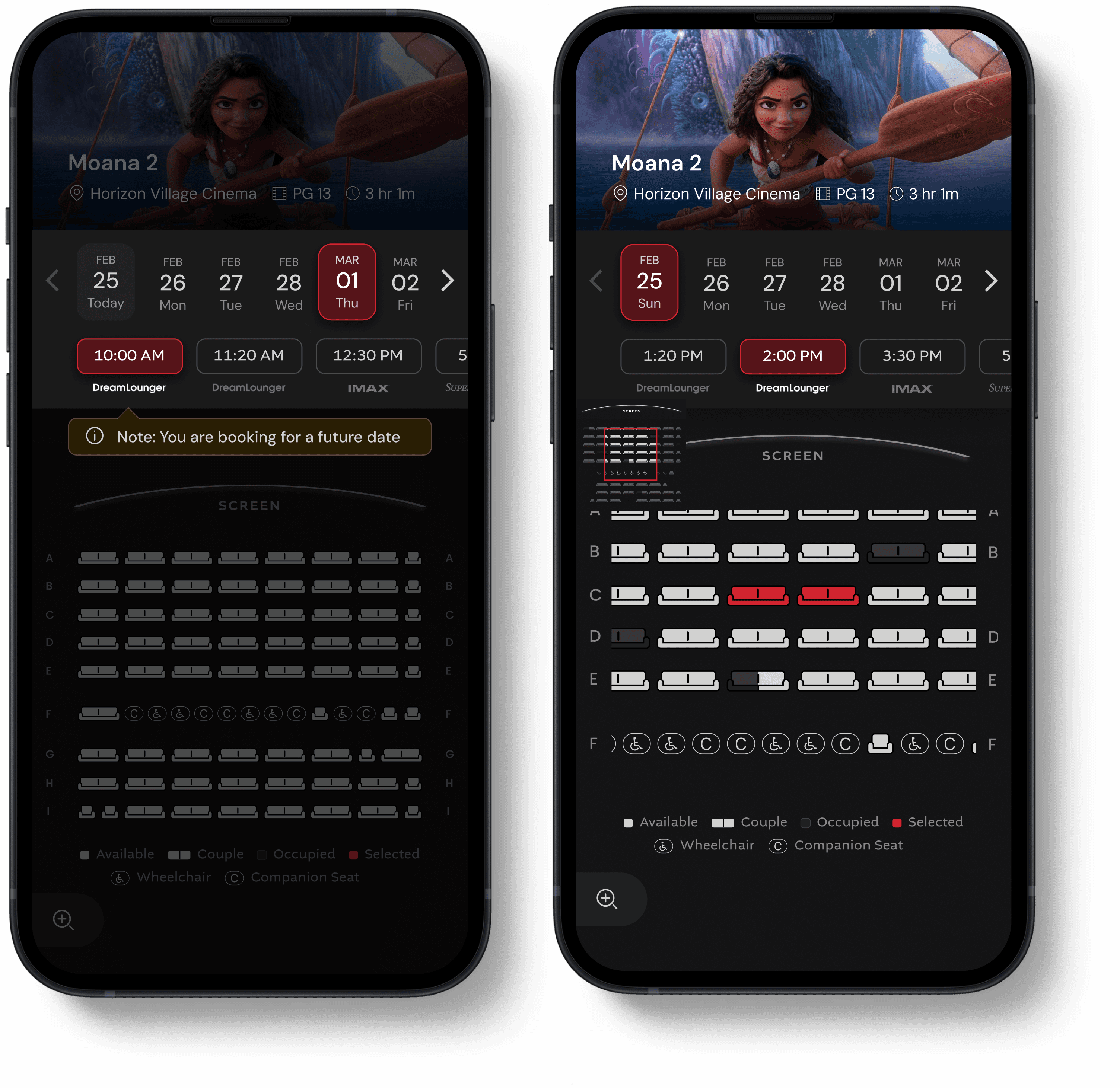
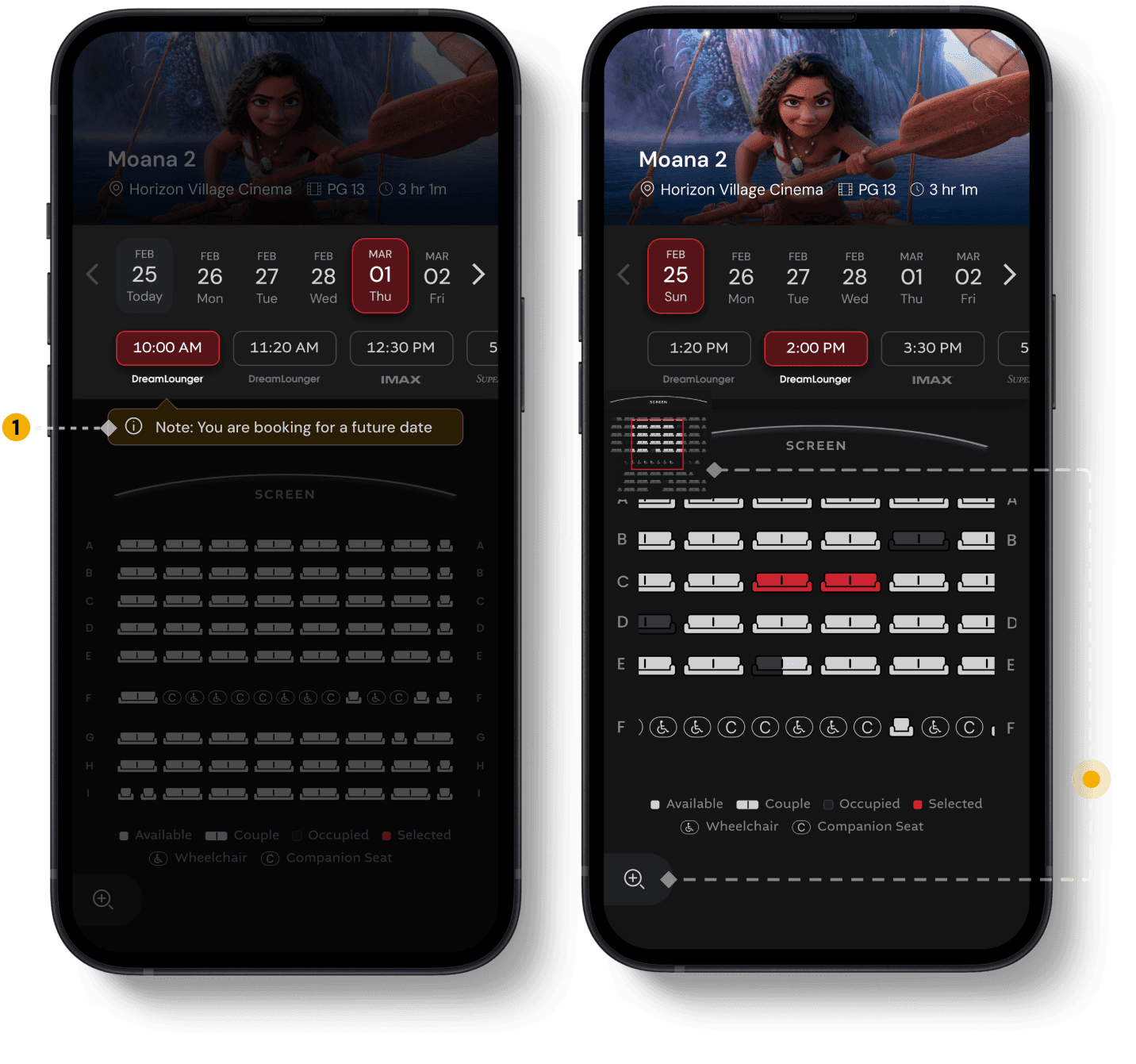
Accidental Future-Date Bookings
Users were accidentally booking tickets for future releases, leading to an increase in booking cancellations.
Before
After
PHASE 2 RELEASE
Zoom position reference
A small overview modal shows the full seat layout and highlights the user’s current zoomed-in area, helping users see where their selected seats are located in the overall theatre layout.
Zoom-in for seat selection
Users can zoom in within the seat layout to select seats more easily, improving accessibility when a row has more than 15 seats


IMPACT
SEP - OCT ‘25
Time on Task (on this page)
19.2%
From 1m 13s → 59s, after redesign
STEP 1/5
Seat Layout
Problems
1.
Users were showing up at the wrong location
Most users compare & select their showtimes from google search result and land on the seat layout directly (which did not have the location name specified)
Before
After
SOLUTION
Confirm Theatre Location
If users arrive from a third-party site, they’re prompted to confirm the theatre location before viewing the seat layout.
Problems
1.
Missing theatre name
The seat selection page didn’t show which theatre the user was booking for, leading to accidental bookings for the wrong location.
2.
No quick way to switch showtimes
If preferred seats were sold out, users couldn’t change the date or showtime from the seat map and had to go back to the showtimes page.
3.
Row numbers disappeared while scrolling
When users scrolled the seat layout, row labels got hidden, making seat selection harder and more error-prone.
Before
After
SOLUTION
Theatre Name Specified
The theatre name is displayed alongside the movie details, making it easy for users to quickly confirm the location.
Change Date & Showtime
Users can browse and switch dates & showtimes across different experience formats, such as IMAX and 4DX.
Zoomed-Out Seat Layout
Viewing the full seat layout at a zoomed-out level helps users quickly decide where they want to sit in the theatre.
Problems
1.
No direct way to edit ticket types
To change a ticket type, users had to unselect and reselect their seats.
2.
“Apply to all” was hard to undo
Once enabled, users had no clear way to revert it. Users had to trial-and-error by unselecting & reselecting seats just to reopen the ticket selection modal.
3.
Unclear age ranges for ticket types
Users couldn’t easily understand which age group each ticket type applied to.
4.
Low visibility of “Apply to all”
The feature wasn’t highlighted enough, despite it’s significance in reducing interaction cost (of repeat actions and effort)
New US Regulation - Fee transparency:
A new US regulation requires cinemas to show convenience fees upfront, along with the ticket price. Previously, this fee appeared only at checkout. At Marcus Theatres, only non-members have to pay this fee.
Before
After
SOLUTION
Reduced Friction in Ticket Editing
Previously, users had to unselect and reselect seats to change ticket types. Now, they can edit tickets directly.
Defined Age Groups
Clear range of age groups mentioned for special tickets
Highlighted “Apply to all seats”
Fee transparency & Waiver condition
Clear messaging reassures members that convenience fee is waived for them
4
Problems
1.
No Ticket Review or Easy Edits
There was no way for users to review all selected tickets, and changing a ticket type required unselecting and reselecting seats.
Before
After
SOLUTION
Edit tickets
Users can change ticket types directly from the drawer.
Ticket count & total cost
Users can see the number of tickets selected and the total cost upfront.
Feature discovery via tooltips
Temporary tooltips guide users and highlight the new ticket-editing feature.
Problems
1.
Accidental Future-Date Bookings
Users were accidentally booking tickets for future releases, leading to an increase in booking cancellations.
Before
After
PHASE 2 RELEASE
Zoom position reference
A small overview modal shows the full seat layout and highlights the user’s current zoomed-in area, helping users see where their selected seats are located in the overall theatre layout.
Zoom-in for seat selection
Users can zoom in within the seat layout to select seats more easily, improving accessibility when a row has more than 15 seats
IMPACT •
SEP - OCT ‘25
Time on Task (on this page)
19.2%
From 1m 13s → 59s, after redesign
STEP 2/5
Login
NEW PAGE
Problems
1.
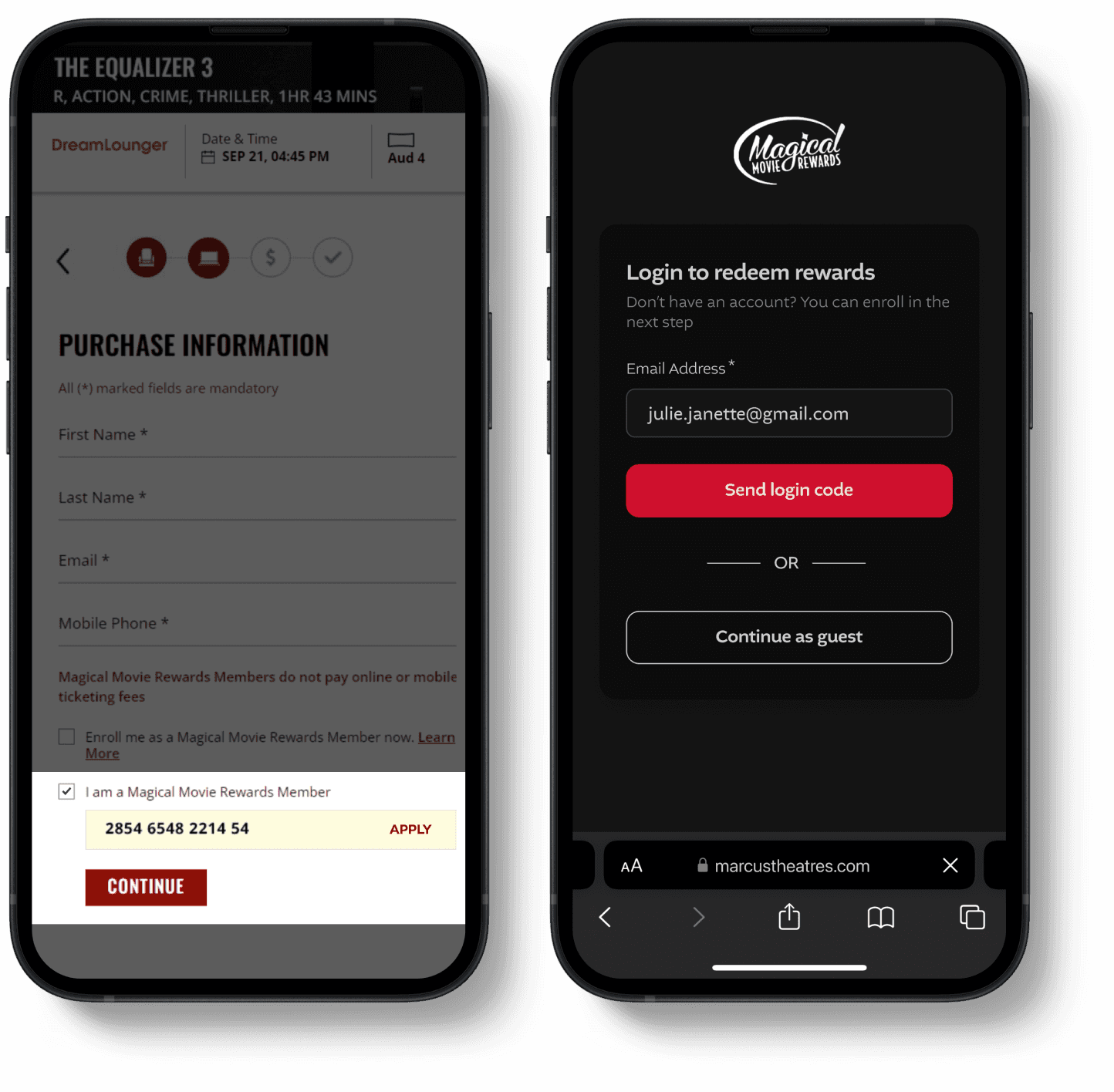
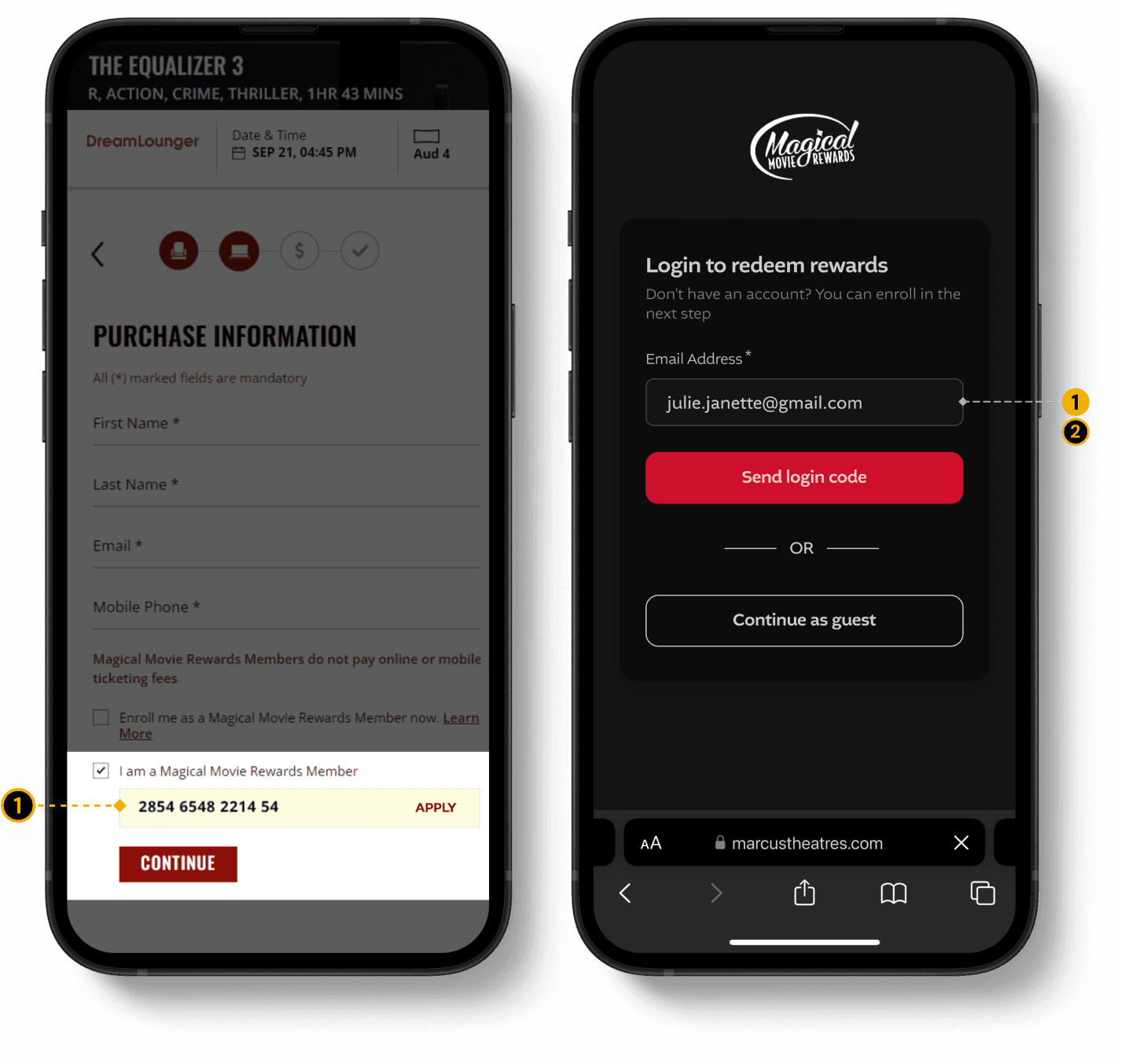
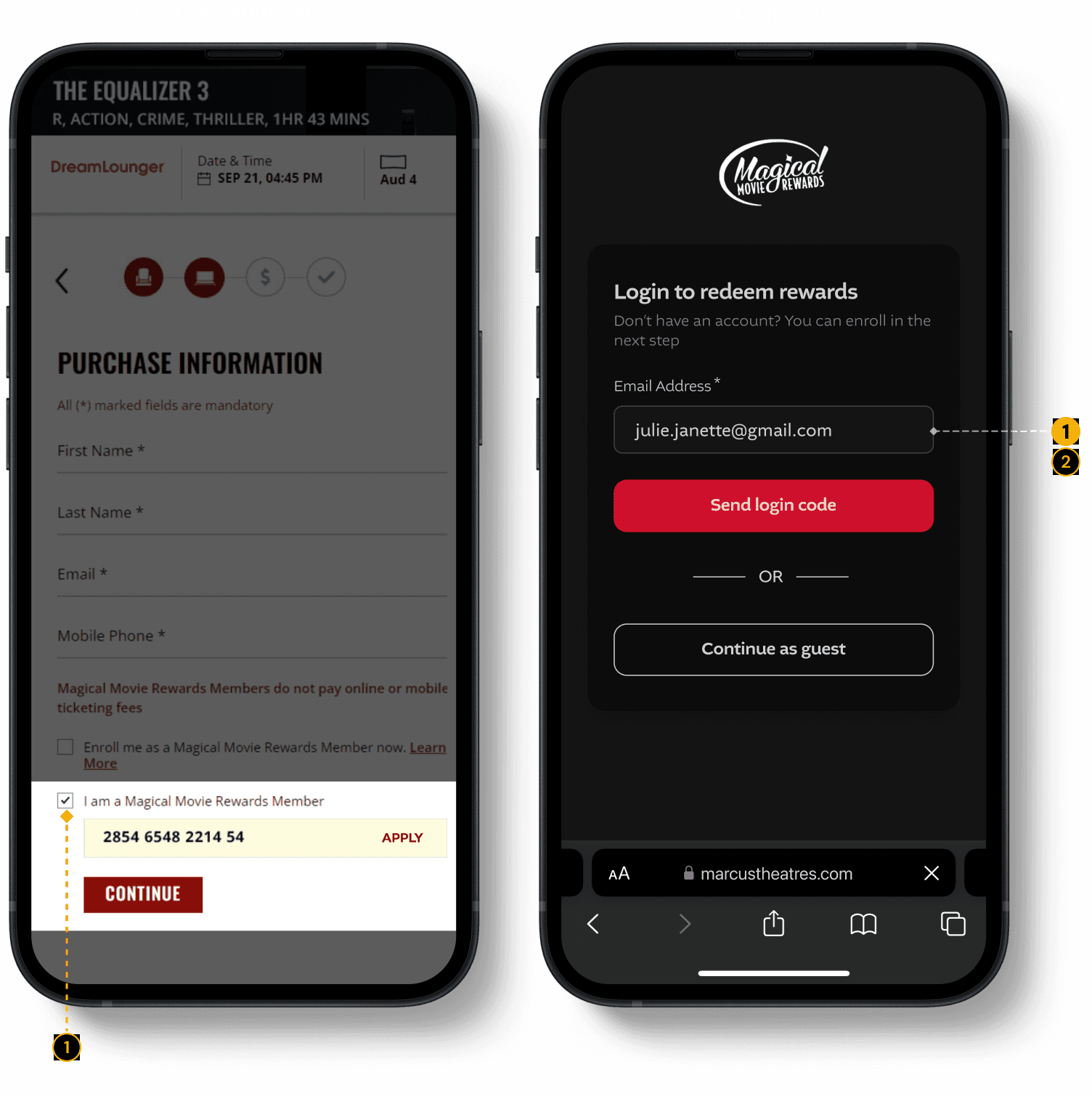
Rewards Redemption Required 14-digit Number
The only way to redeem rewards was by entering a 14-digit member number. Since the system didn’t save this information, users had to re-enter it for every booking.
2.
No Login + Auto-Filling details
Users couldn’t log in and had to enter all their details manually every time.
Before
After
SOLUTION
Email Login & Member Details Auto-Fetched
Users can now log in using their email and a one-time code to fetch all their details: Member Details, Redeem Rewards, Gift cards, Saved payment methods
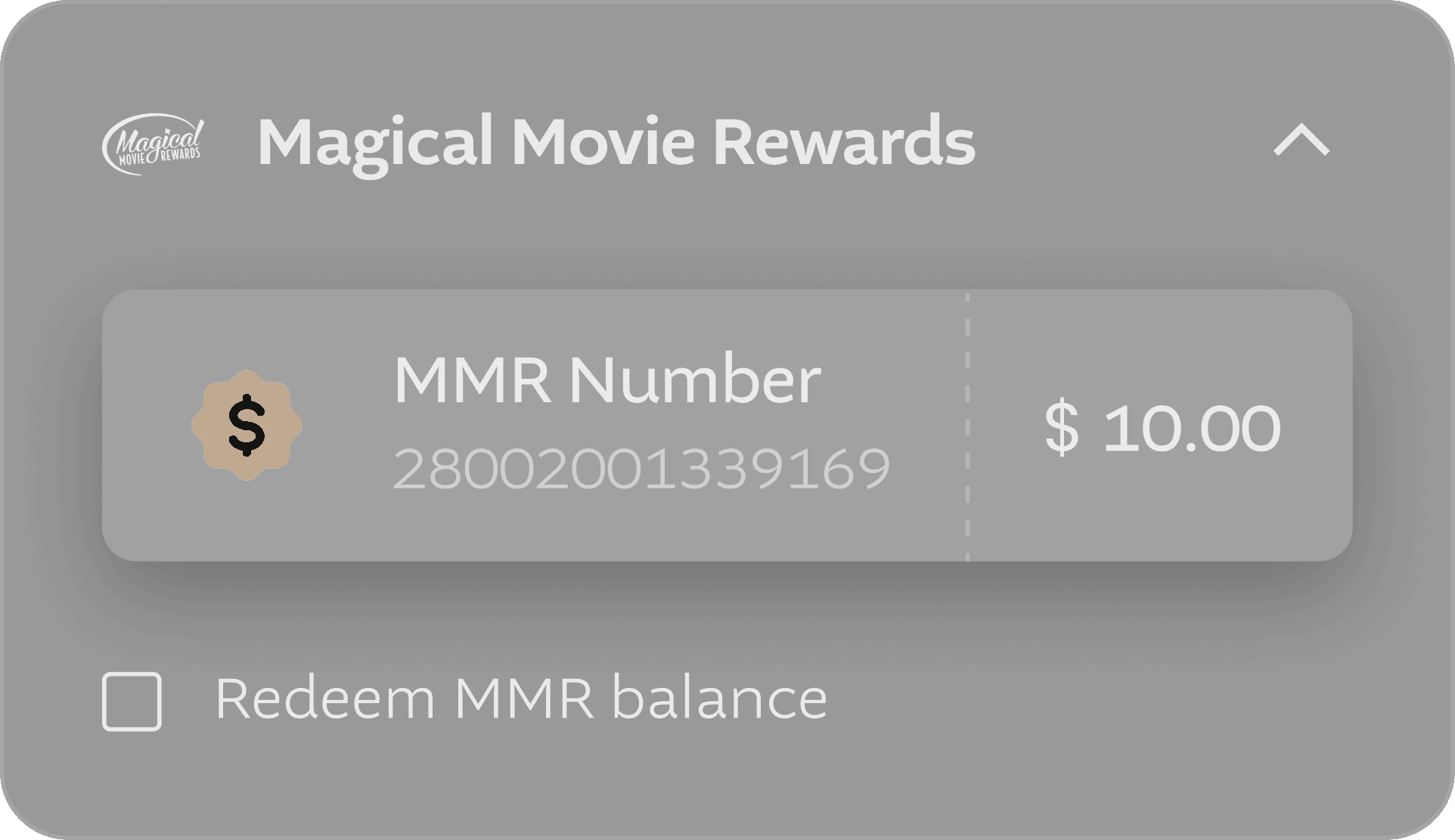
Earlier redeeming rewards required a 14-digit member number, which most users don’t remember or keep handy.

IMPACT
SEP - DEC ‘25
Login
adoption rate
40.3%
STEP 2/5
Login
NEW PAGE
Problems
1.
Rewards Redemption Required 14-digit Number
The only way to redeem rewards was by entering a 14-digit member number. Since the system didn’t save this information, users had to re-enter it for every booking.
2.
No Login + Auto-Filling details
Users couldn’t log in and had to enter all their details manually every time.
Before
After
SOLUTION
Email Login & Member Details Auto-Fetched
Users can now log in using their email and a one-time code to fetch all their details: Member Details, Redeem Rewards, Gift cards, Saved payment methods
Earlier redeeming rewards required a 14-digit member number, which most users don’t remember or keep handy.
IMPACT •
SEP - DEC ‘25
Login
adoption rate
40.3%
STEP 3/5
Checkout
Problems
1.
Users Skipping Date & Time Check
Users often booked the wrong date and time because it wasn’t clearly highlighted and got overlooked while entering other details.
2.
Can’t review / edit tickets
Users couldn’t review or edit their selected tickets.
Secondary Payment Methods: Reward points, gift cards, passes & vouchers were moved from the payment page to the checkout page in redesign to keep payment step more focused and distraction-free.
Before
After
SOLUTION
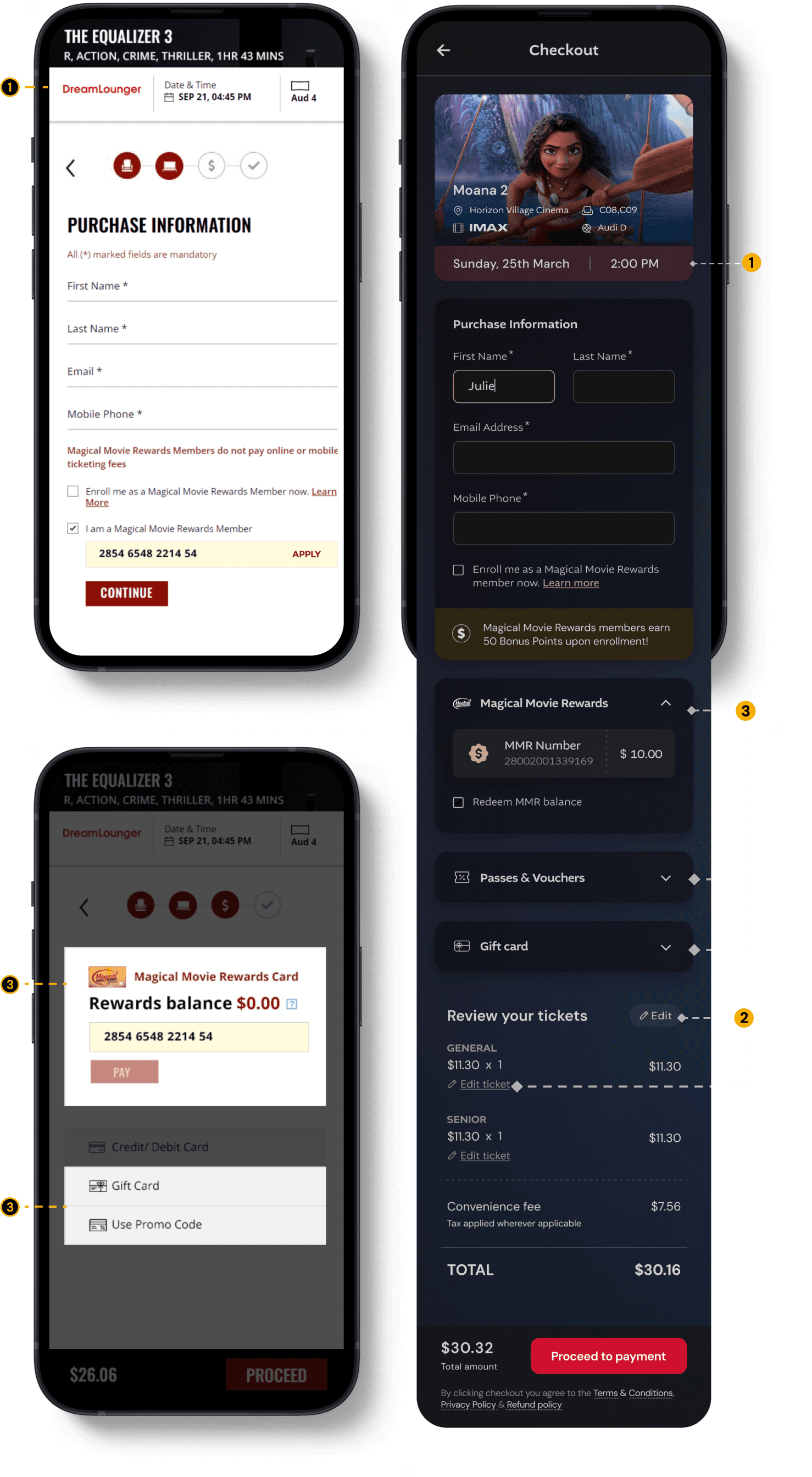
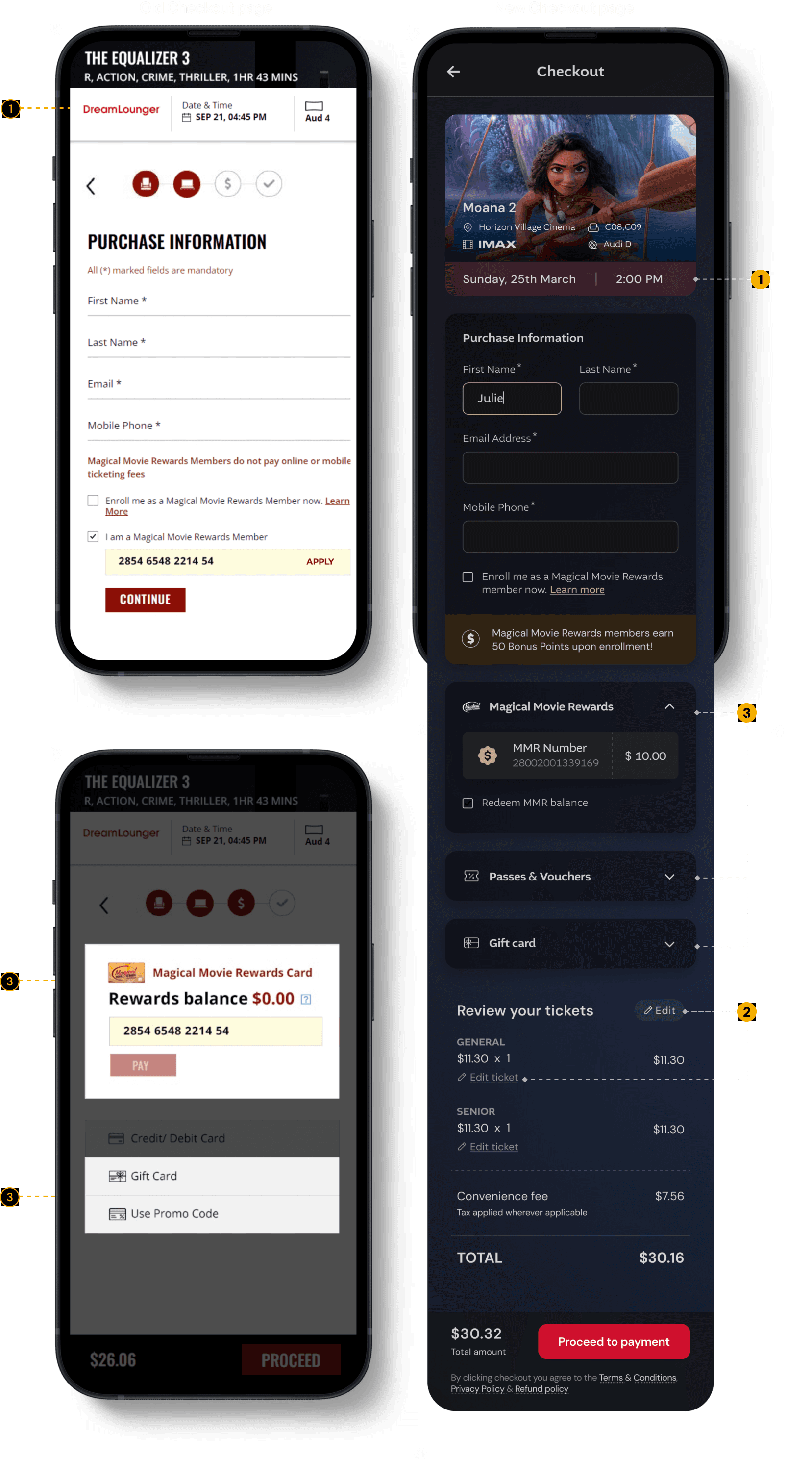
Quick Showtime Confirmation
Date and time are clearly shown below the movie details, for users to quickly confirm them without going back in the flow. This reduces stress and last-minute panic.
Flexible Ticket Editing
Users can edit ticket types at this step if they made an error. A clear ticket breakdown with an edit option next to each ticket type lets them make changes without returning to the seat layout.
Moved to Checkout to Simplify Payment
→ Reward redemption, Gift cards, Passes & Vouchers
All secondary payment methods were moved from the payment page to the checkout page due to integration limitations, while also keeping the payment step more focused and distraction-free.
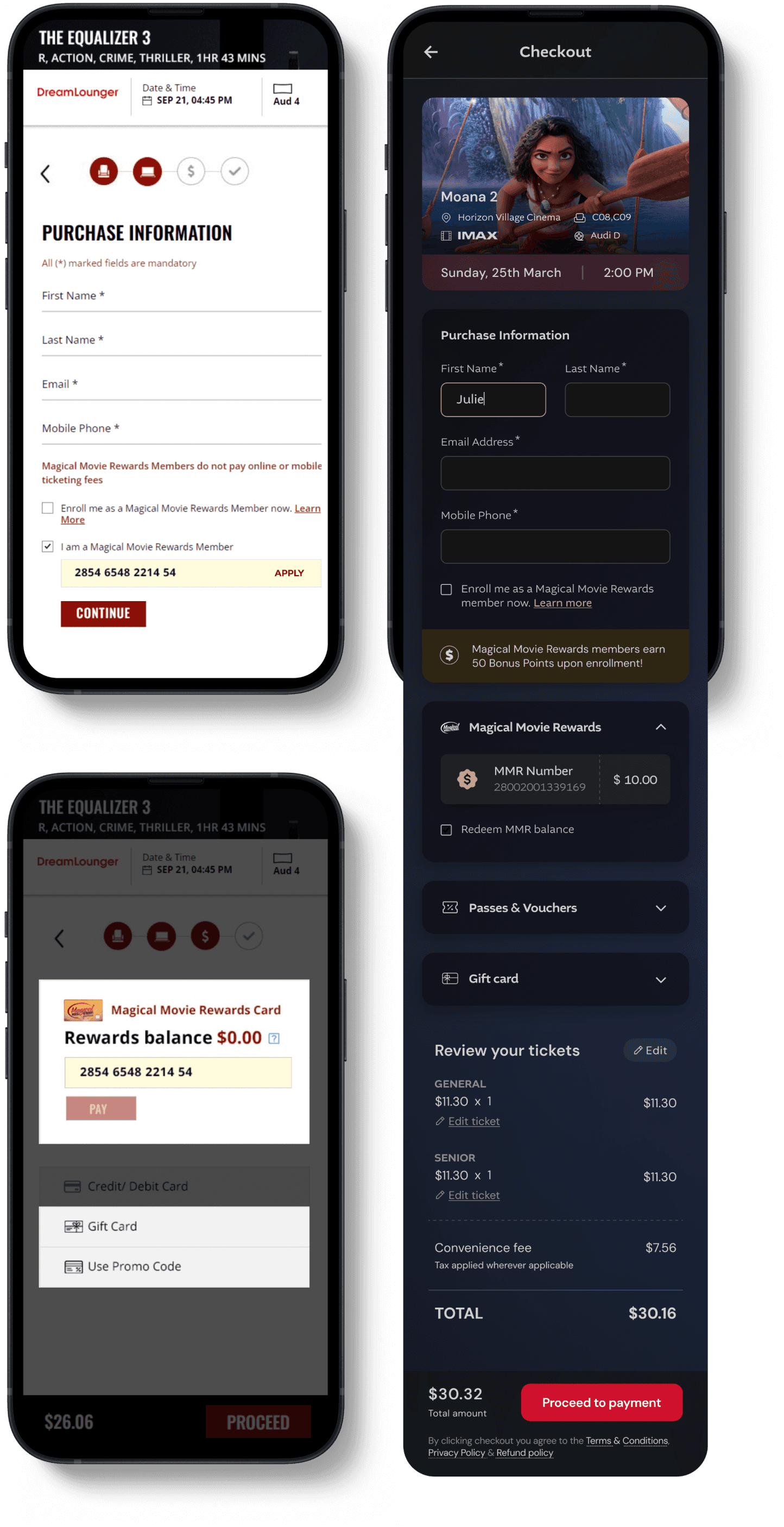
Old Payment page


IMPACT
SEP - DEC ‘25
Time on Task (on this page)
31.3%
From 1m 07s → 46s, after redesign
STEP 3/5
Checkout
Problems
1.
Users Skipping Date & Time Check
Users often booked the wrong date and time because it wasn’t clearly highlighted and got overlooked while entering other details.
2.
Can’t review / edit tickets
Users couldn’t review or edit their selected tickets.
Secondary Payment Methods: Reward points, gift cards, passes & vouchers were moved from the payment page to the checkout page in redesign to keep payment step more focused and distraction-free.
Before
After
SOLUTION
Quick Showtime Confirmation
Date and time are clearly shown below the movie details, for users to quickly confirm them without going back in the flow. This reduces stress and last-minute panic.
Flexible Ticket Editing
Users can edit ticket types at this step if they made an error. A clear ticket breakdown with an edit option next to each ticket type lets them make changes without returning to the seat layout.
Moved to Checkout to Simplify Payment
→ Reward redemption, Gift cards, Passes & Vouchers
All secondary payment methods were moved from the payment page to the checkout page due to integration limitations, while also keeping the payment step more focused and distraction-free.
Old Payment page
IMPACT •
SEP - DEC ‘25
Time on Task (on this page)
31.3%
From 1m 07s → 46s, after redesign
STEP 4/5
Payment
Problems
1.
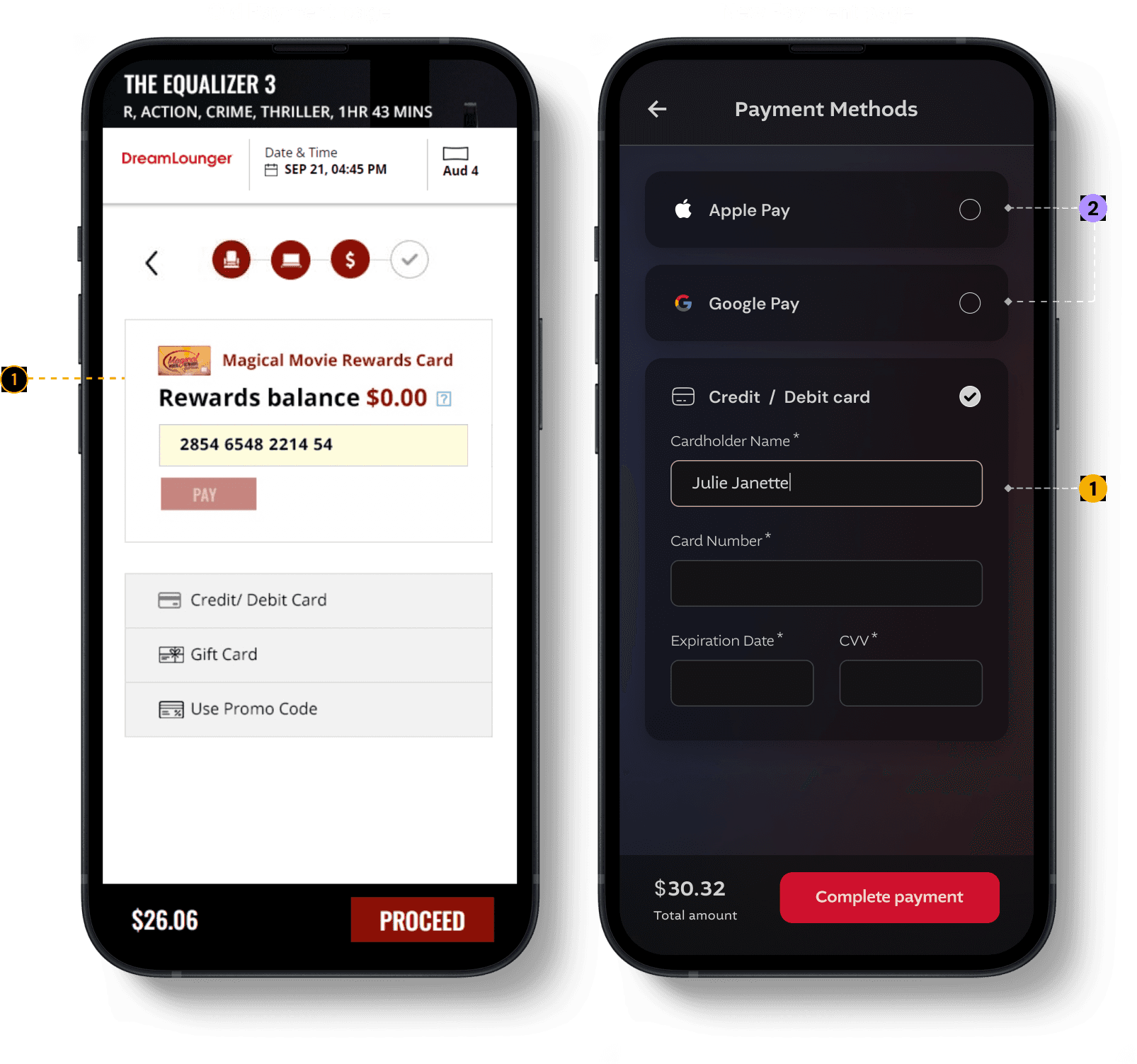
Rewards-First Payment Flow Increased Drop-Offs
Keeping rewards redemption as the primary payment method caused drop-offs because users had to enter a 14-digit member number if they hadn’t done it earlier, while card payments were kept as a secondary option.
NEW INTEGRATIONS
2.
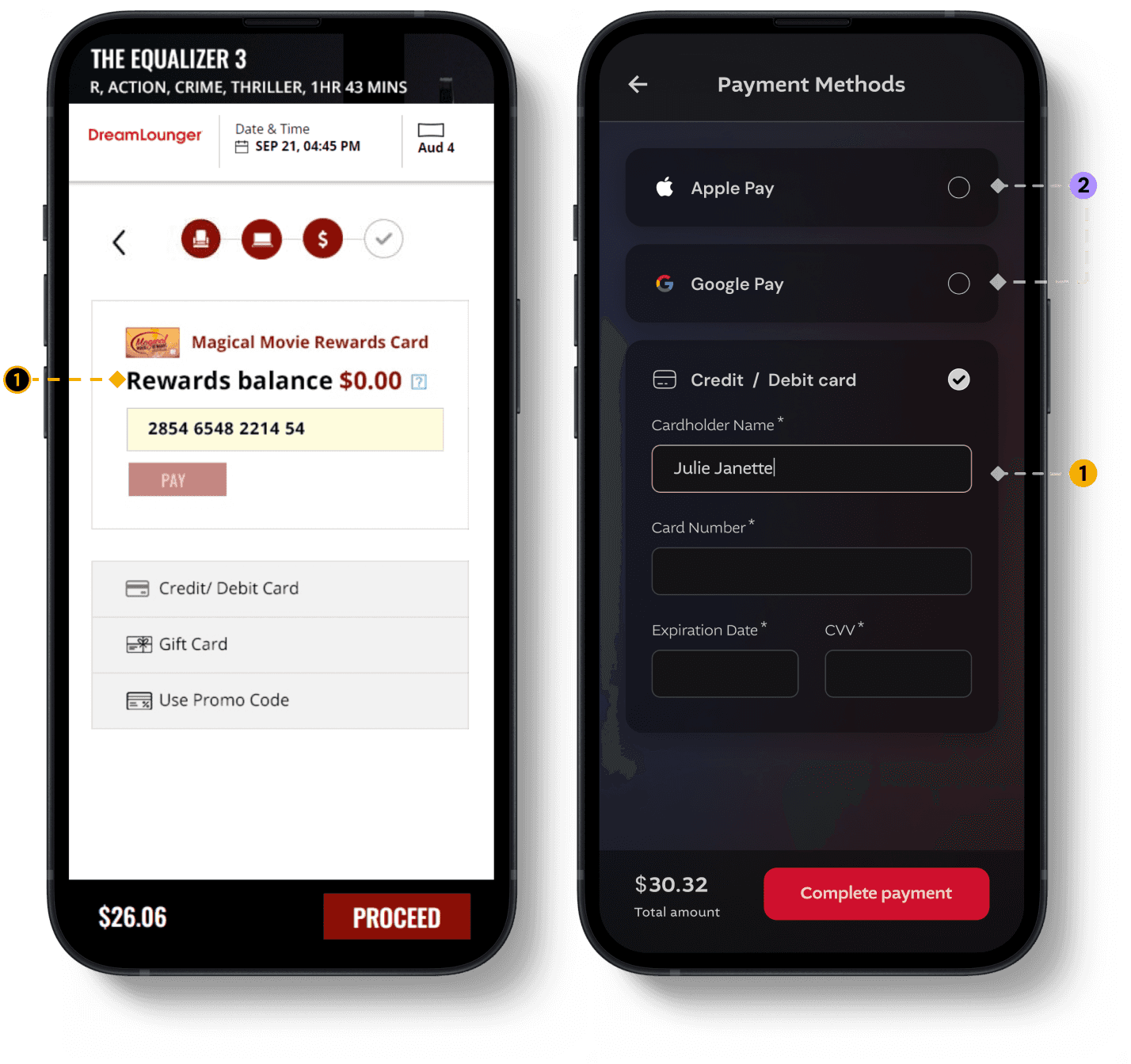
Apple Pay & Google Pay
New payment modes were added during the revamp
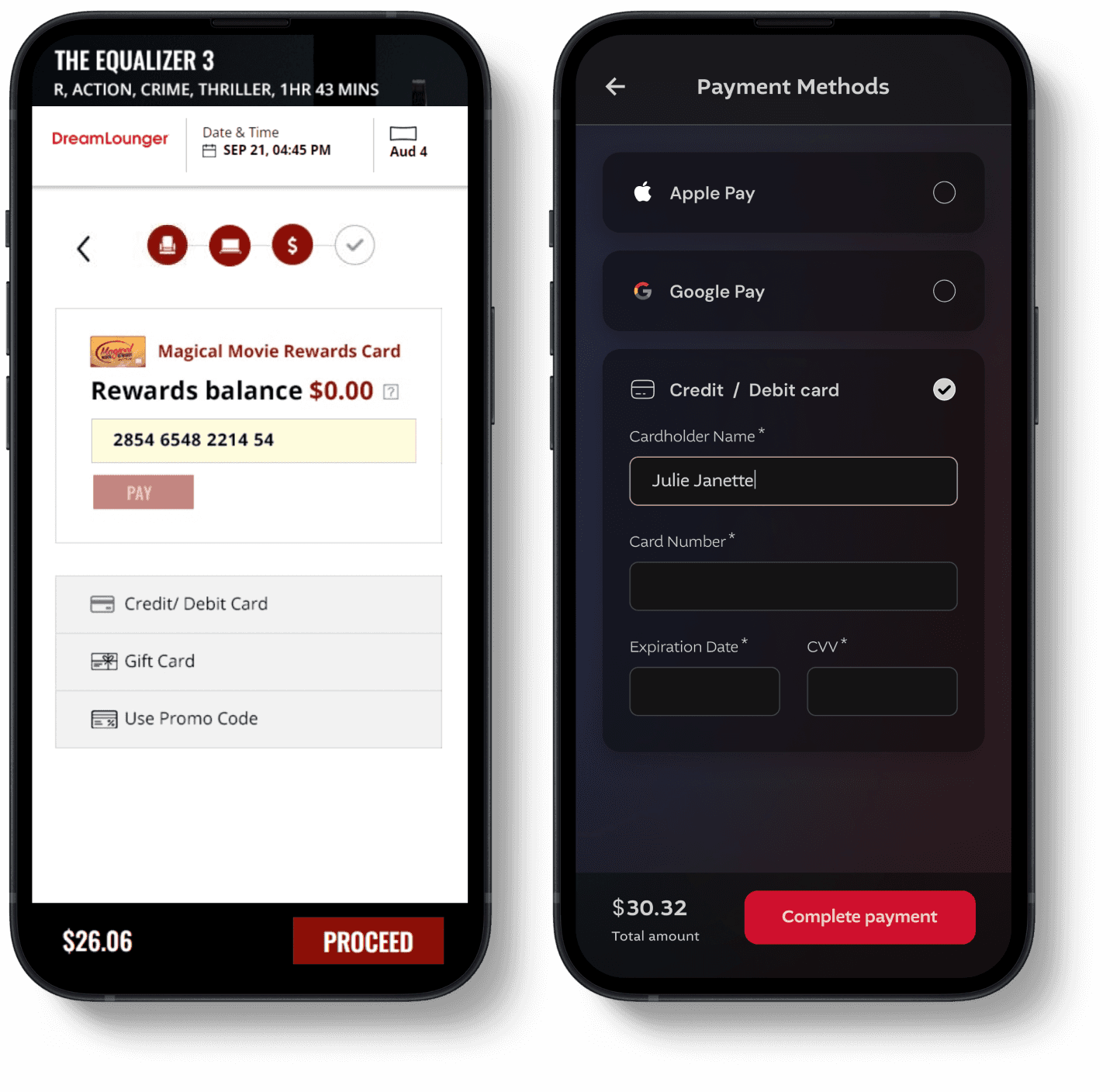
Secondary Payment Methods: Reward points, gift cards, passes & vouchers were moved from the payment page to the checkout page in redesign to keep payment step more focused and distraction-free.
Before
After
SOLUTION
Simplified Payment Step
Reduced distractions by moving rewards, gift cards, and vouchers to the checkout step, keeping payment selection straightforward.

Added Faster Payments: Apple Pay & Google Pay
Introduced Apple Pay for iOS and Google Pay for Android to enable quicker, smoother checkout.

IMPACT
SEP ‘25 - JAN ‘26
Time on Task (on this page)
63.2%
From 1m 46s → 39s, after redesign
Reduction in Drop-off rate
70.8%
From 20.6% → 6%, after redesign
STEP 4/5
Payment
Problems
1.
Rewards-First Payment Flow Increased Drop-Offs
Keeping rewards redemption as the primary payment method caused drop-offs because users had to enter a 14-digit member number if they hadn’t done it earlier, while card payments were kept as a secondary option.
NEW INTEGRATIONS
2.
Apple Pay & Google Pay
New payment modes were added during the revamp
Secondary Payment Methods: Reward points, gift cards, passes & vouchers were moved from the payment page to the checkout page in redesign to keep payment step more focused and distraction-free.
Before
After
SOLUTION
Simplified Payment Step
Reduced distractions by moving rewards, gift cards, and vouchers to the checkout step, keeping payment selection straightforward.
Added Faster Payments: Apple Pay & Google Pay
Introduced Apple Pay for iOS and Google Pay for Android to enable quicker, smoother checkout.
IMPACT •
SEP ‘25 - JAN ‘26
Time on Task (on this page)
63.2%
From 1m 46s → 39s, after redesign
Reduction in Drop-off rate
70.8%
From 20.6% → 6%, after redesign
STEP 5/5
Confirmation
Confirmation
Problems
1.
Increased Fraud: Misuse of Discounted Tickets
Users were selecting discounted ticket types (Child/Senior) to pay less, leading to a rise in misuse. Theatre managers also had no quick way to identify bookings with special tickets for verification.
2.
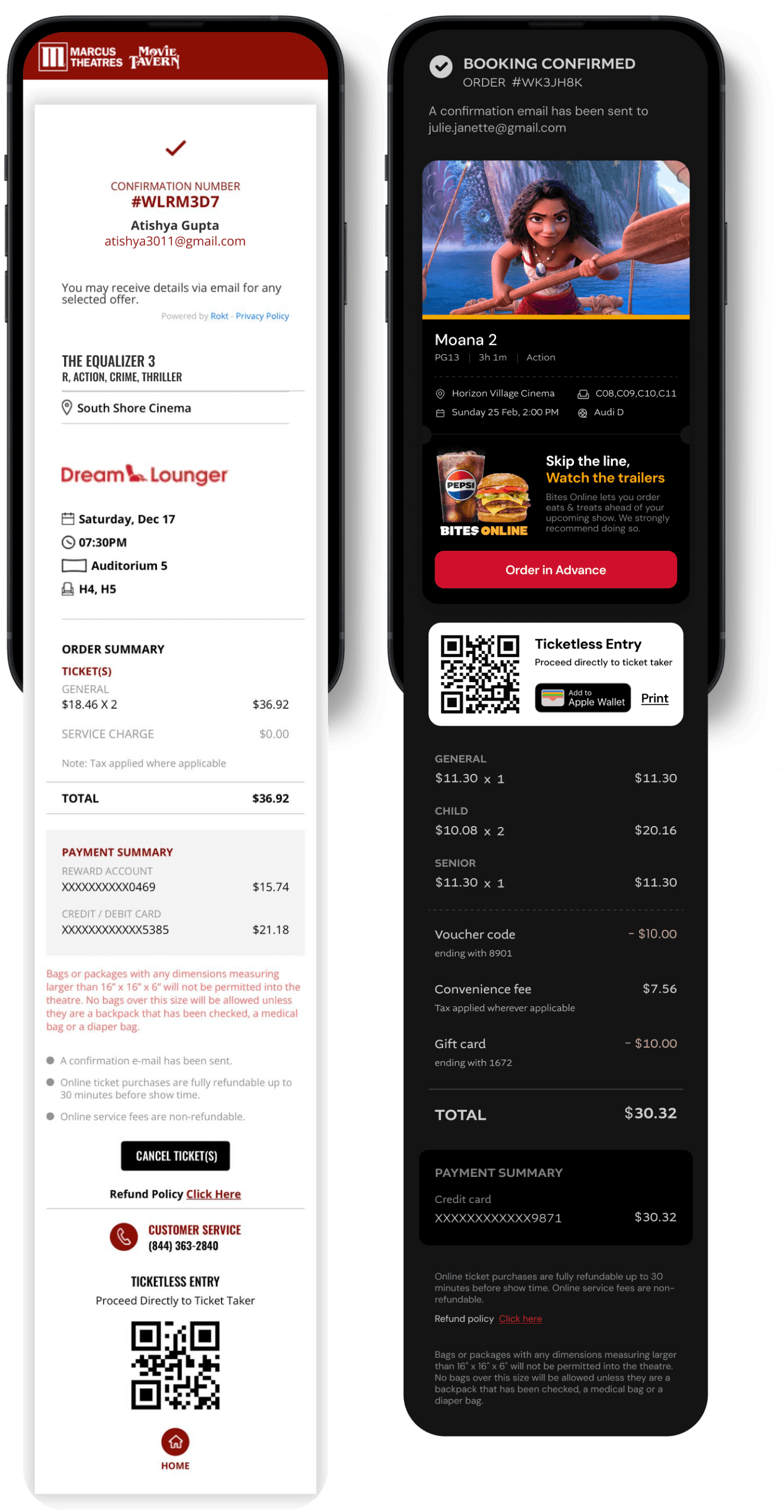
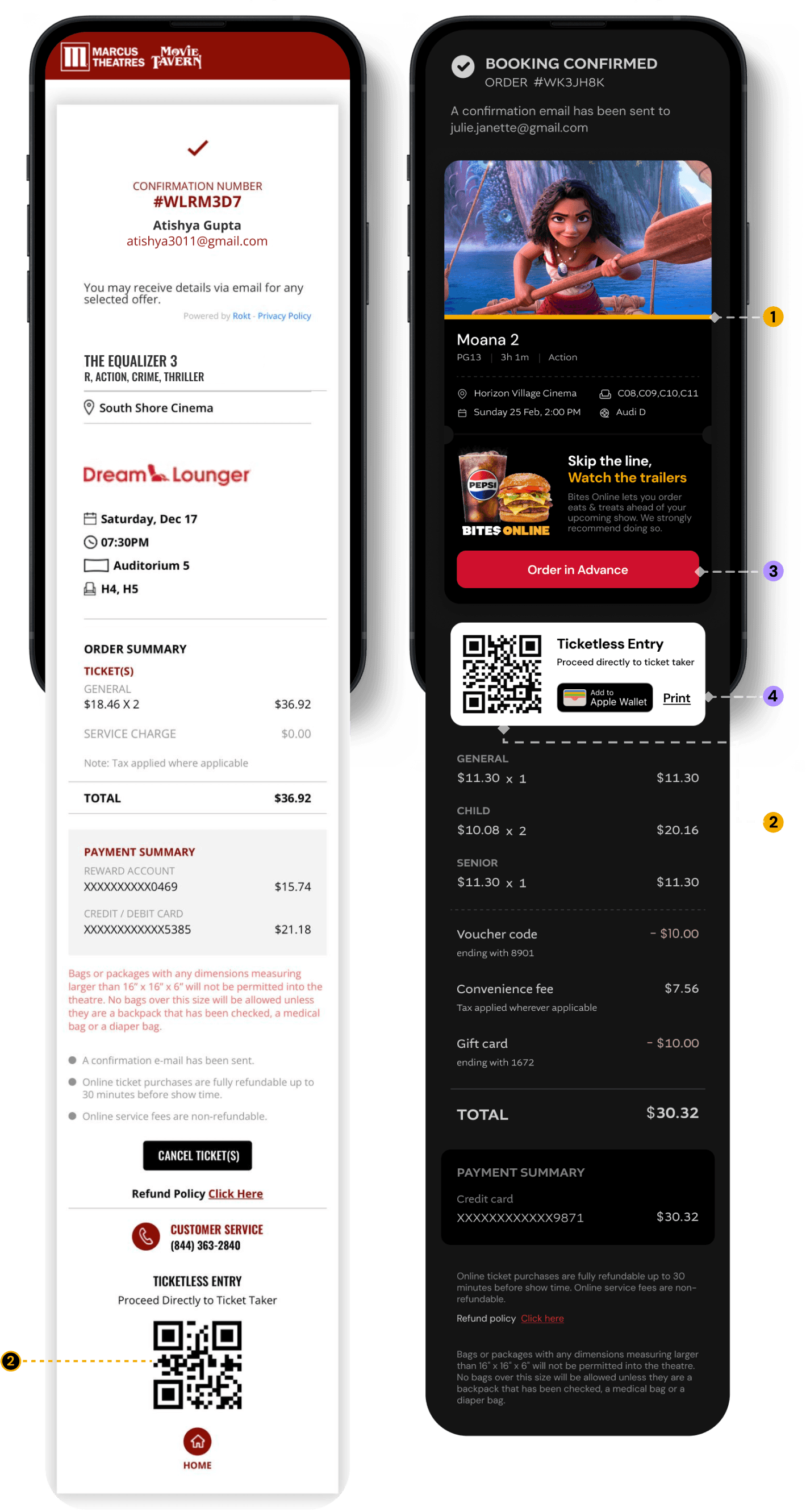
Confirmation Page Was Hard to Scan
The booking confirmation page lacked clear structure, making key details difficult to find. Important elements like the QR code were pushed to the bottom of the page.
NEW INTEGRATIONS
3.
Pre-Order Food
A new feature lets users order food in advance directly from the confirmation page.
4.
Add to Apple Wallet
Users can now add their tickets to Apple Wallet for quick access.
Before
Before
After
After
SOLUTION
Colour-coded strip for different ticket types
A thin colour strip was added to each ticket to quickly indicate the ticket type, helping theatre managers identify special tickets at a glance.
Colour code for tickets:
Child / Senior
General
QR Code Now Visible Upfront
The QR code was moved to the top of the page so users can quickly access it for scanning at the theatre.

Prompting users to pre-order food
Added CTA on confirmation page to drive advance food orders.

Quick access to ticket
Users can now add their tickets to Apple Wallet for quick access.

IMPACT
IMPACT •
OCT - DEC ‘25
Add to wallet
adoption rate
35.2%

Click through rate for 'Order Food'
4.6%
Reduced abandonment rate at payment by 61.3%
Reduced abandonment rate at payment by 61.3%
Reduced abandonment rate at payment by 61.3%
MY ROLE
End-to-end Product design
Building Design Systems
Prototyping
Accessibility (WCAG 2.1)
Stakeholder Alignment
Design Presentations
PROBLEM
An outdated booking experience with major usability gaps was causing wrong-location bookings, clunky ticket edits, & drop-offs during payment.
SOLUTION
Introduced a mobile-first redesign, added a theatre confirmation step for external traffic & colour signifiers for special ticket types to prevent errors.
61.3%
Reduction in
payment drop-offs
$544K
Increase in additional monthly revenue
27.8%
Reduction in order cancellations

MY ROLE
MY ROLE
UX Designer
UX Designer
Go Live
Sep 2025
PRODUCT
PRODUCT
Web & Mobile
Web & Mobile
Team
1x Product Manager
1x QA Analyst
3x Developers
1x UX Designer
TIMELINE
Dec '24 - Jan '25
IMPACT
Reduced time on task by 32.7% (∼1m 21s) by improving overall usability, speeding up purchase decisions, and strengthening the end-to-end booking experience.
Improved final-stage transaction conversions by 14%, unlocking additional $544K in monthly revenue.
Reduced payment-stage drop-offs by 61% by eliminating friction points & distractions
Responsive design
Responsive design
Prototyping
Prototyping
Accessibility (WCAG 2.1)
Accessibility
Stakeholder Alignment
Stakeholder Alignment
Design Presentations
Design Presentations
MY ROLE
UX Designer
PRODUCT
Web & Mobile
Go live
Sep 2025
TIMELINE
Dec '24 - Jan '25
IMPACT
Reduced time on task by 32.7% (∼1m 21s) by improving overall usability, speeding up purchase decisions, and strengthening the end-to-end booking experience.
Improved final-stage transaction conversions by 14%, unlocking additional $544K in monthly revenue.
Reduced payment-stage drop-offs by 61.3% by eliminating friction points & distractions
TEAM
1 x UX Designer
3 x Developers
1 x QA Analyst
1 x Product Manager
Responsive design
Prototyping
Accessibility (WCAG 2.1)
Stakeholder Alignment
Design Presentations
TL;DR
TL;DR
One-minute project overview
One-minute project overview
One-minute project overview
INDUSTRY
Entertainment
TIMELINE
Dec '24 - Feb '25
TEAM
1 x UX Designer
3 x Developers
1 x QA Analyst
1 x Product Manager
Context
Context
Website redesign - starting with ticketing
Website redesign - starting with ticketing
Marcus Theatres' website hadn’t meaningfully changed in 13+ years. The redesign kicked off with their highest-impact flow: ticketing.
Marcus Theatres' website hadn’t meaningfully changed in 13+ years. The redesign kicked off with their highest-impact flow: ticketing.
PROBLEM
PROBLEM
1.
1.
Abandonment at payment: Keeping rewards redemption as the primary payment method caused drop-offs because users had to manually enter a 14-digit member number every time.
Abandonment at payment: Keeping rewards redemption as the primary payment method caused drop-offs because users had to manually enter a 14-digit member number every time.
Abandonment at payment: Keeping rewards redemption as the primary payment method caused drop-offs because users had to manually enter a 14-digit member number every time.
2.
2.
Wrong theatre bookings: The seat layout page didn’t show theatre details, causing users to book the wrong location.
Wrong theatre bookings: The seat layout page didn’t show theatre details, causing users to book the wrong location.
3.
3.
Discount ticket misuse: Child and Senior tickets were misused due to limited verification at theatres.
Discount ticket misuse: Child and Senior tickets were misused due to limited verification at theatres.
SOLUTION
SOLUTION
1.
1.
Auto-fill details: Users can now log in with their email to auto-fill details & redeem rewards, removing the bottleneck at payment.
Auto-fill details: Users can now log in with their email to auto-fill details & redeem rewards, removing the bottleneck at payment.
2.
2.
Theatre confirmation step: Users landing from third-party sites were prompted to confirm their theatre before seat selection.
Theatre confirmation step: Users landing from third-party sites were prompted to confirm their theatre before seat selection.
3.
3.
Special tickets signifier: Added colour indicators to tickets so theatre staff could instantly identify special ticket types
Special tickets signifier: Added colour indicators to tickets so theatre staff could instantly identify special ticket types
IMPACT
IMPACT
1.
1.
32.7% faster time on task (~1m 21s) through improved usability and clearer decision-making.
32.7% faster time on task (~1m 21s) through improved usability and clearer decision-making.
2.
2.
27.8% reduction in order cancellations that were caused by wrong location, date & time selection
27.8% reduction in order cancellations that were caused by wrong location, date & time selection
3.
3.
61.3% reduction in payment drop-offs by removing friction and distractions at checkout
61.3% reduction in payment drop-offs by removing friction and distractions at checkout
THE CLIENT
THE CLIENT
About Marcus Theatres
About Marcus Theatres
About Marcus Theatres
$450M
$450M
Annual Revenue
Annual Revenue
2M+
2M+
Website MAU
Website MAU
Entertainment
Entertainment
Industry
Industry
Marcus Theatres is a major cinema chain in the US operating in 78 theatre locations across 19 states, each theatre has anywhere between 5-30+ showtimes daily, depending upon movie & day of the week.
Known for their premium large-format screens, loyalty programme, and in-theatre food experience.
What they offer:
Marcus Theatres is a major cinema chain in the US operating in 78 theatre locations across 19 states, each theatre has anywhere between 5-30+ showtimes daily, depending upon movie & day of the week.
Known for their premium large-format screens, loyalty programme, and in-theatre food experience.
What they offer:
1.
1.
Movie tickets
Movie tickets
Across web, mobile app, and in-theatre kiosks
2.
2.
Food and beverages
Food and beverages
At theatres (concessions and in-theatre dining options)
3.
3.
Loyalty Rewards
Loyalty Rewards
Through Magical Movie Rewards with points earned on tickets & concessions
Outdated experience
Outdated experience
The website was long overdue for a redesign, with the experience staying largely unchanged for 13+ years.
The website was long overdue for a redesign, with the experience staying largely unchanged for 13+ years.
Not mobile-first
Not mobile-first
The experience wasn’t designed for mobile, despite 85% traffic coming from mobile web.
The experience wasn’t designed for mobile, despite 85% traffic coming from mobile web.
Usability gaps
Usability gaps
The current site had major usability issues as user expectations evolved, making the journey feel functional but not user-friendly.
The current site had major usability issues as user expectations evolved, making the journey feel functional but not user-friendly.
Low discoverability
Low discoverability
Most users only came to book after exploring movies elsewhere, limiting engagement across the site.
Most users only came to book after exploring movies elsewhere, limiting engagement across the site.
Brand mismatch
Brand mismatch
The brand evolved, but the website didn’t reflect it, impacting perceived quality and trust.
The brand evolved, but the website didn’t reflect it, impacting perceived quality and trust.
Younger audience focus
Younger audience focus
The redesign needed a more modern look and feel to better appeal to younger users.
The redesign needed a more modern look and feel to better appeal to younger users.
THE MOTIVATION
THE MOTIVATION
Why the redesign?
Why the redesign?
Why the redesign?
DEFINING PROBLEM STATEMENT
DEFINING PROBLEM STATEMENT
Core problems
Core problems
Core problems
Core issues in ticketing flow were identified through Marcus Theatres’ support tickets and user complaints.
Core issues in ticketing flow were identified through Marcus Theatres’ support tickets and user complaints.
USER PROBLEM
USER PROBLEM
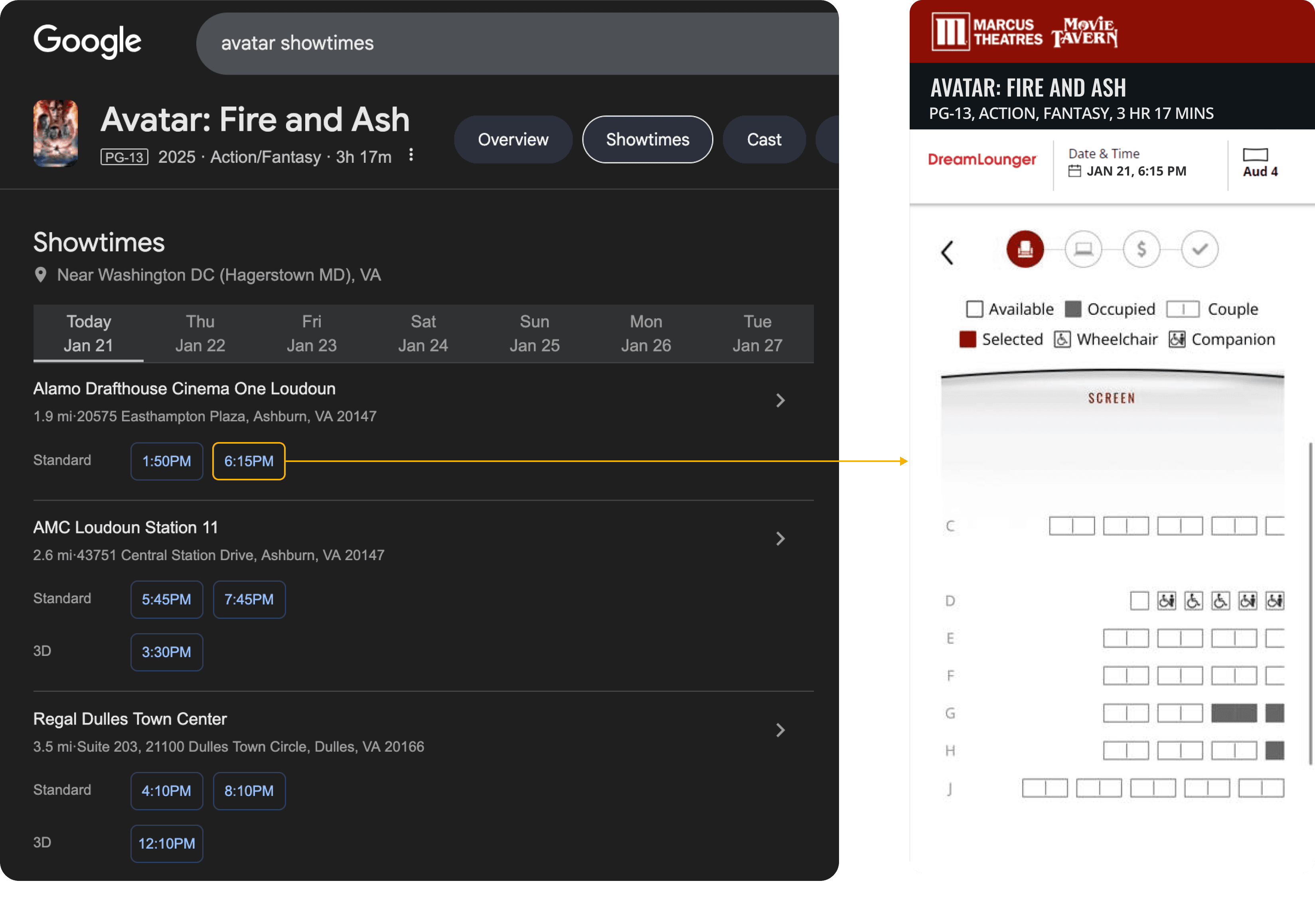
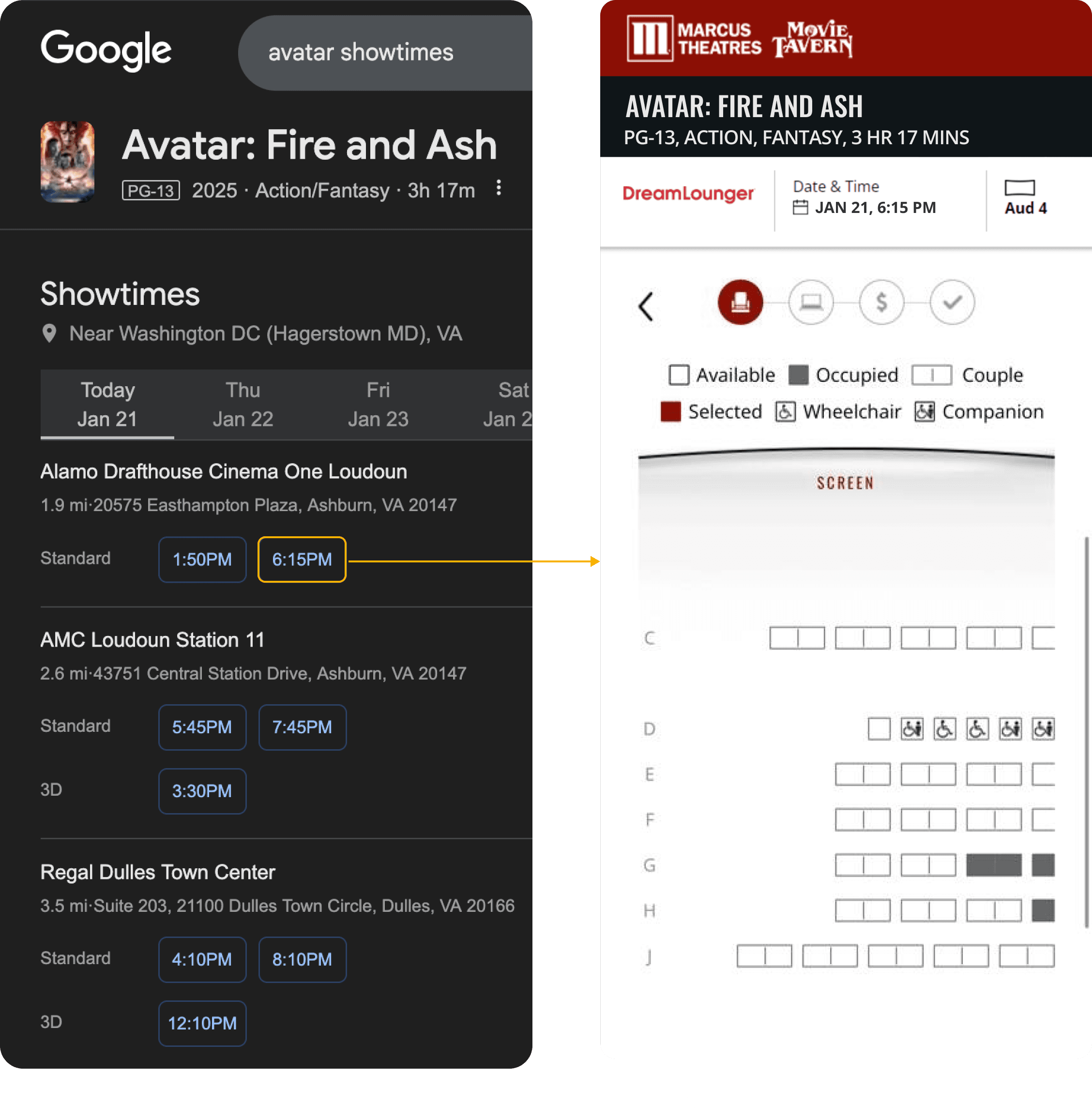
Users were showing up at the wrong location
Users were showing up at the wrong location
Most users compare & select their showtimes from google search result and land on the seat layout directly (which did not have the location name specified)
Most users compare & select their showtimes from google search result and land on the seat layout directly (which did not have the location name specified)
BUSINESS PROBLEM
BUSINESS PROBLEM
Increased fraud: Misuse of Discounted Tickets
Increased fraud: Misuse of Discounted Tickets
Misuse of child/senior pricing
Misuse of child/senior pricing
Users selected Child/Senior tickets to pay less, increasing misuse and revenue leakage.
Users selected Child/Senior tickets to pay less, increasing misuse and revenue leakage.
No quick way to verify
No quick way to verify
Booking confirmation didn’t show a visible indicator for special ticket types, making verification harder for staff.
Booking confirmation didn’t show a visible indicator for special ticket types, making verification harder for staff.
Hard to enforce during peak times
Hard to enforce during peak times
On busy weekends and high-demand shows, managers couldn’t realistically check every ticket in the crowd.
On busy weekends and high-demand shows, managers couldn’t realistically check every ticket in the crowd.
Different ticket types
Different ticket types
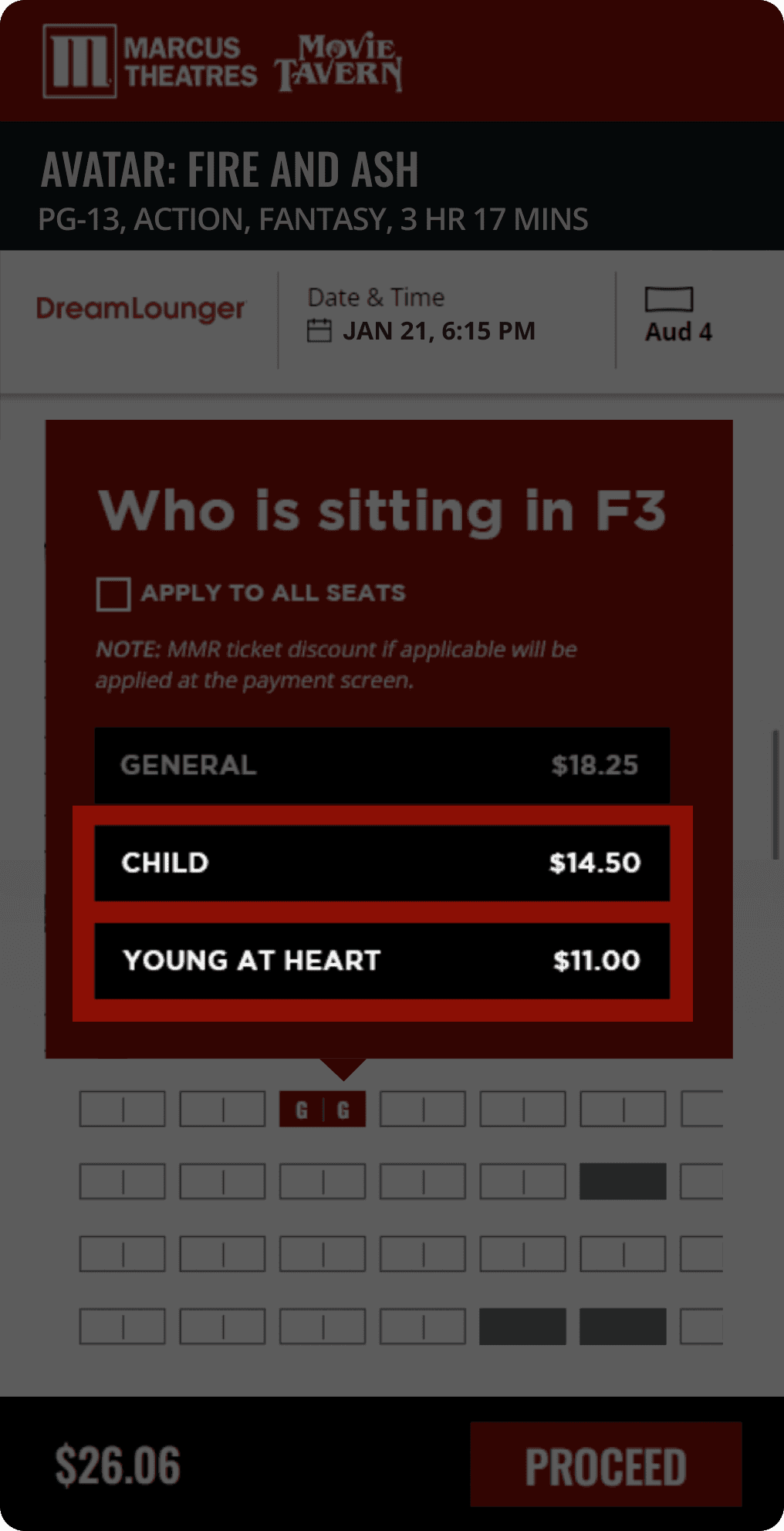
Special tickets
available at discounted price
MORE PROBLEMS
MORE PROBLEMS
Other issues
to tackle
Other issues to tackle
Other issues to tackle
These issues were identified through heuristic analysis, competitive research, and usability testing.
These issues were identified through heuristic analysis, competitive research, and usability testing.

1
Seat layout
1
Seat layout

2
Checkout
2
Checkout
3
Payment
3
Payment
3
Payment

4
4
Confirmation
Confirmation
4
Confirmation
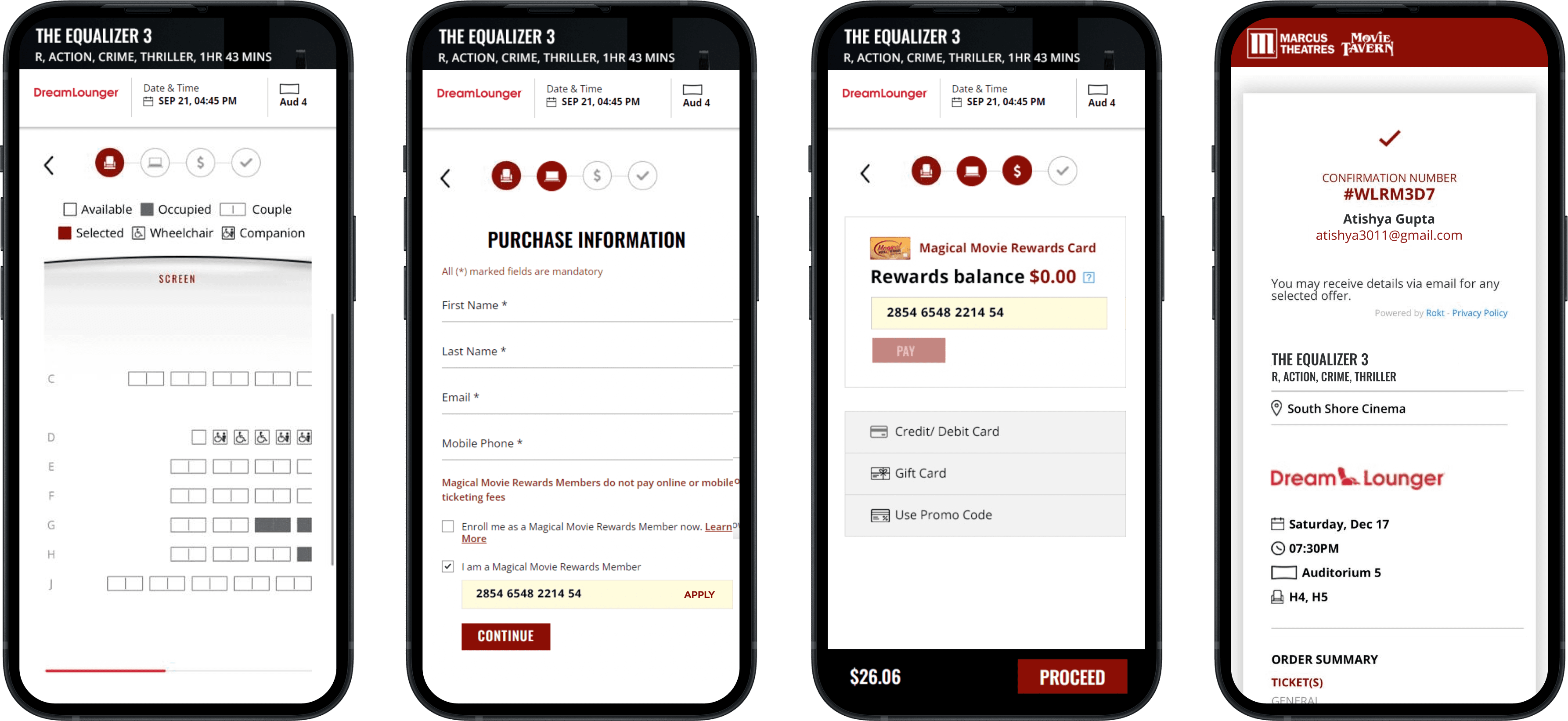
Missing theatre name
No quick way to switch showtimes
No Ticket Review or Easy Edits
No way to warn users they’re booking for a future-date
Missing theatre name
No quick way to switch showtimes
No Ticket Review or Easy Edits
No way to warn users they’re booking for a future-date
Missing theatre name
No quick way to switch showtimes
No Ticket Review or Easy Edits
No way to warn users they’re booking for a future-date
Rewards redemption required 14-digit number
No login + auto-filling details
Can’t review / edit tickets
Users were skipping date & time check
Rewards redemption required 14-digit number
No login + auto-filling details
Can’t review / edit tickets
Users were skipping date & time check
Rewards redemption required 14-digit number
No login + auto-filling details
Can’t review / edit tickets
Users were skipping date & time check
Rewards-first payment was increasing drop-offs
Confirmation page was hard to scan
Most important element:
QR code is not visible upfront
Confirmation page was hard to scan
Most important element:
QR code is not visible upfront
DESIGN SYSTEM
DESIGN SYSTEM
Building the
Design System
Building the
Design System
Building the
Design System
Design system & Style guide were initially created for the ticketing flow, then expanded as the design scaled across the full website.
Design system & Style guide were initially created for the ticketing flow, then expanded as the design scaled across the full website.
DESIGN SYSTEM
DESIGN SYSTEM
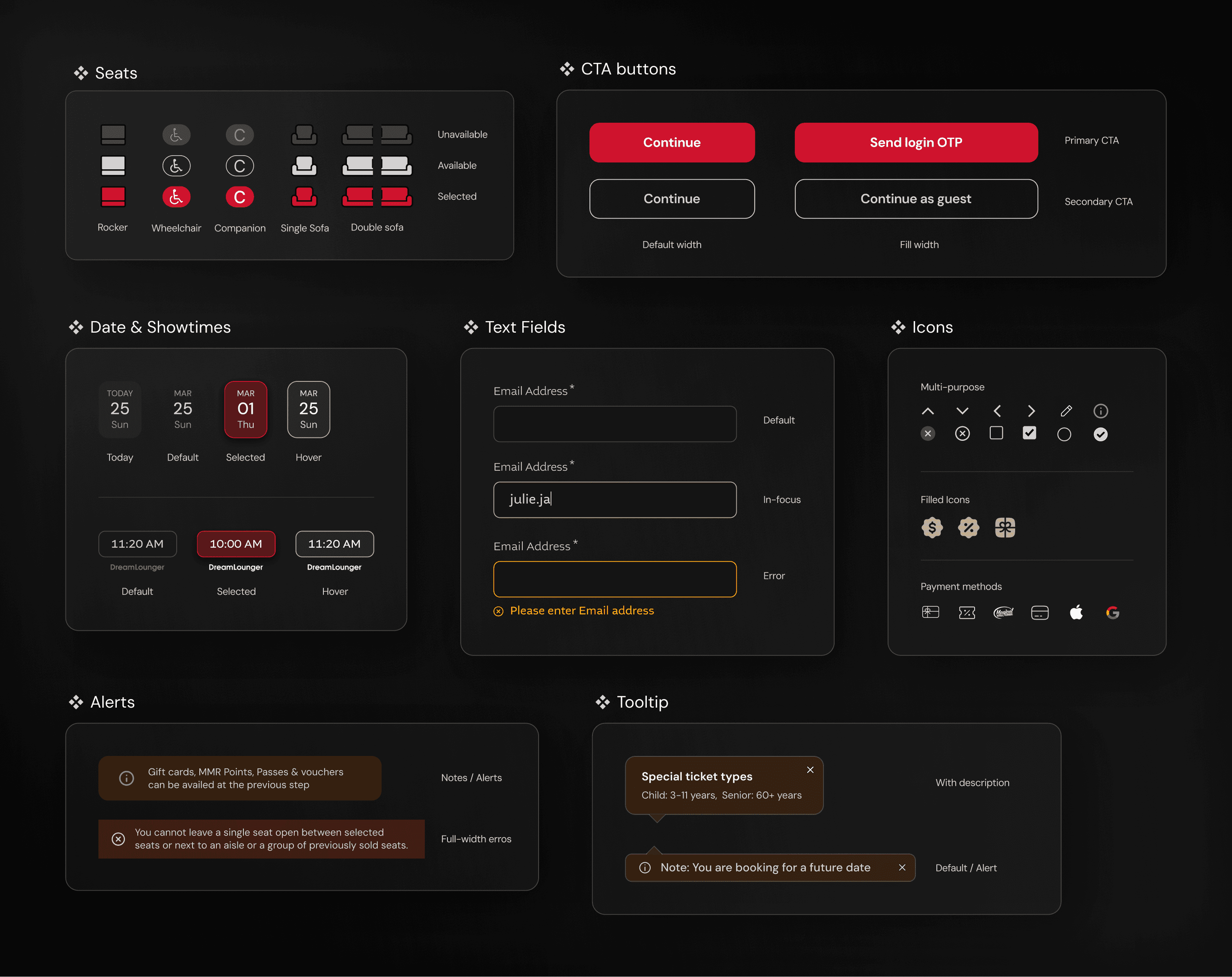
Component & Pattern Library
Component & Pattern Library
I built the foundation for the design system by creating reusable components for the ticketing flow.
As the project expanded into a full website redesign, the component library scaled and evolved to support broader use cases across the platform.
Built the foundation of the design system through reusable components for ticketing flow, which later scaled and evolved to support the full website redesign.
STYLE GUIDES
STYLE GUIDES
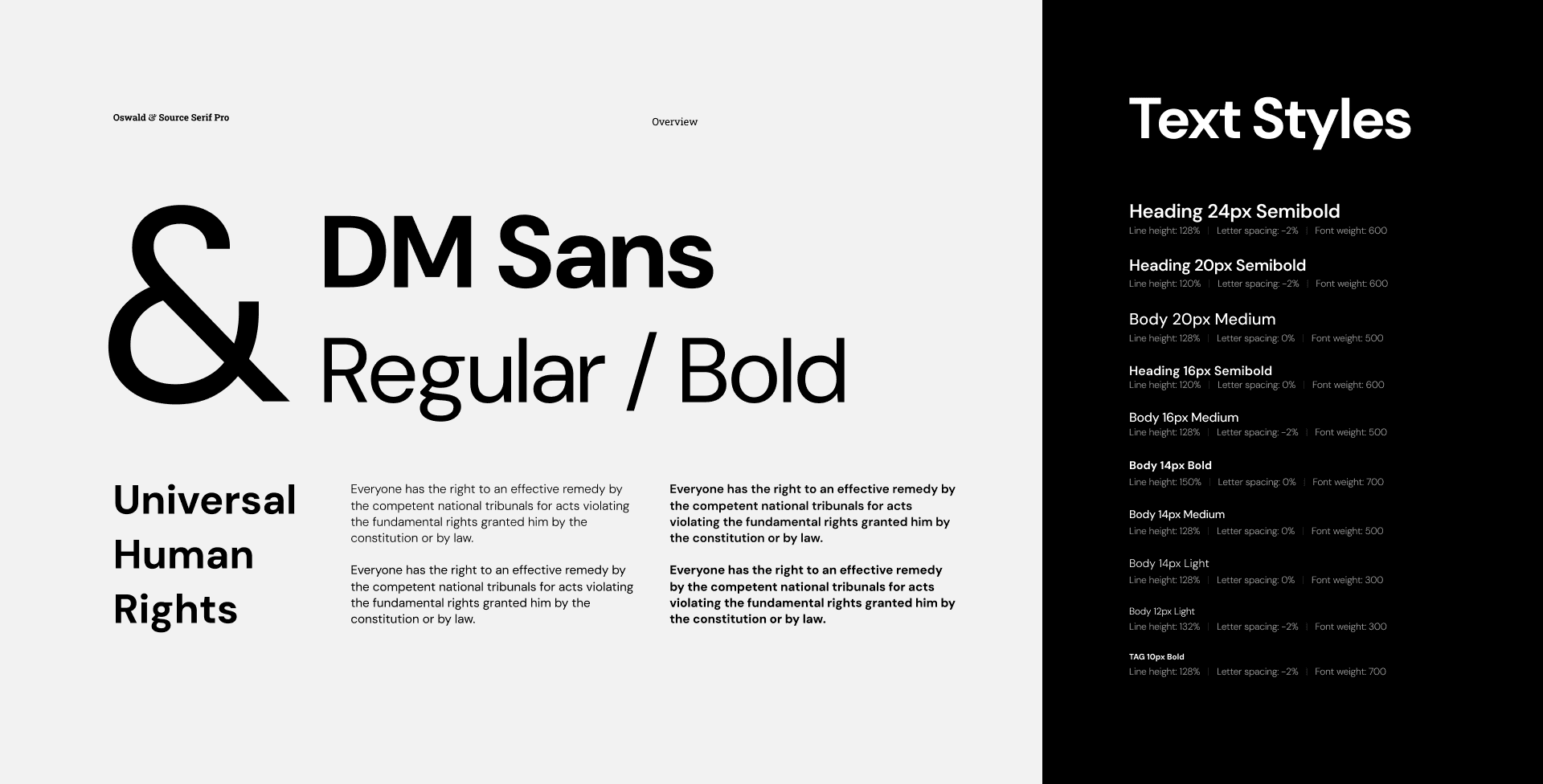
Text & Colour Styles
The redesign shifted to dark mode to match the client’s updated direction. Marcus Red was retained as the primary brand colour, with beige* introduced as a new accent colour.
The redesign shifted to dark mode to match the client’s updated direction. Marcus Red was retained as the primary brand colour, with beige* introduced as a new accent colour.
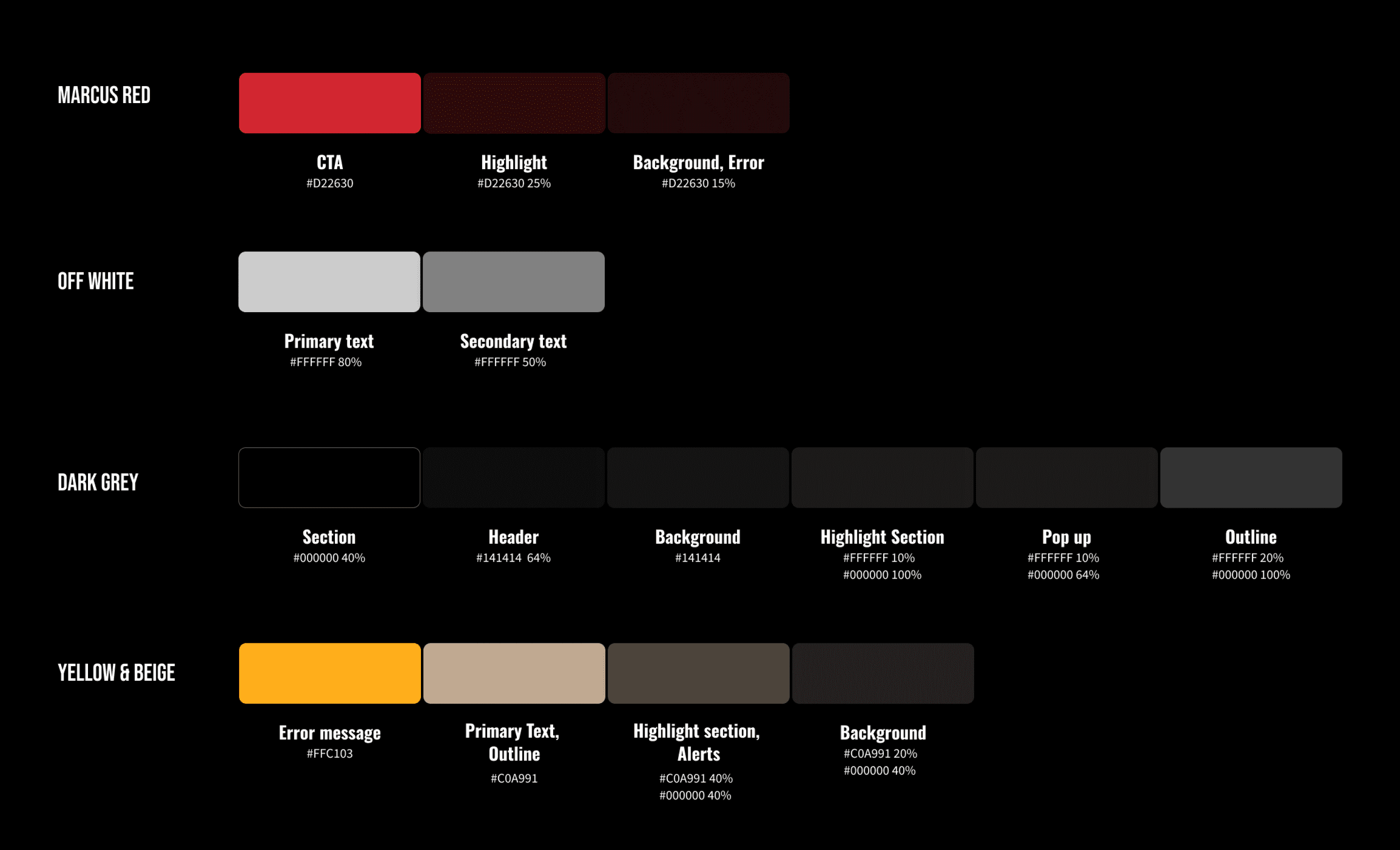
*The accent colour was later updated to gold as the redesign progressed.
*The accent colour was later updated to gold as the redesign progressed.
user flow
user flow
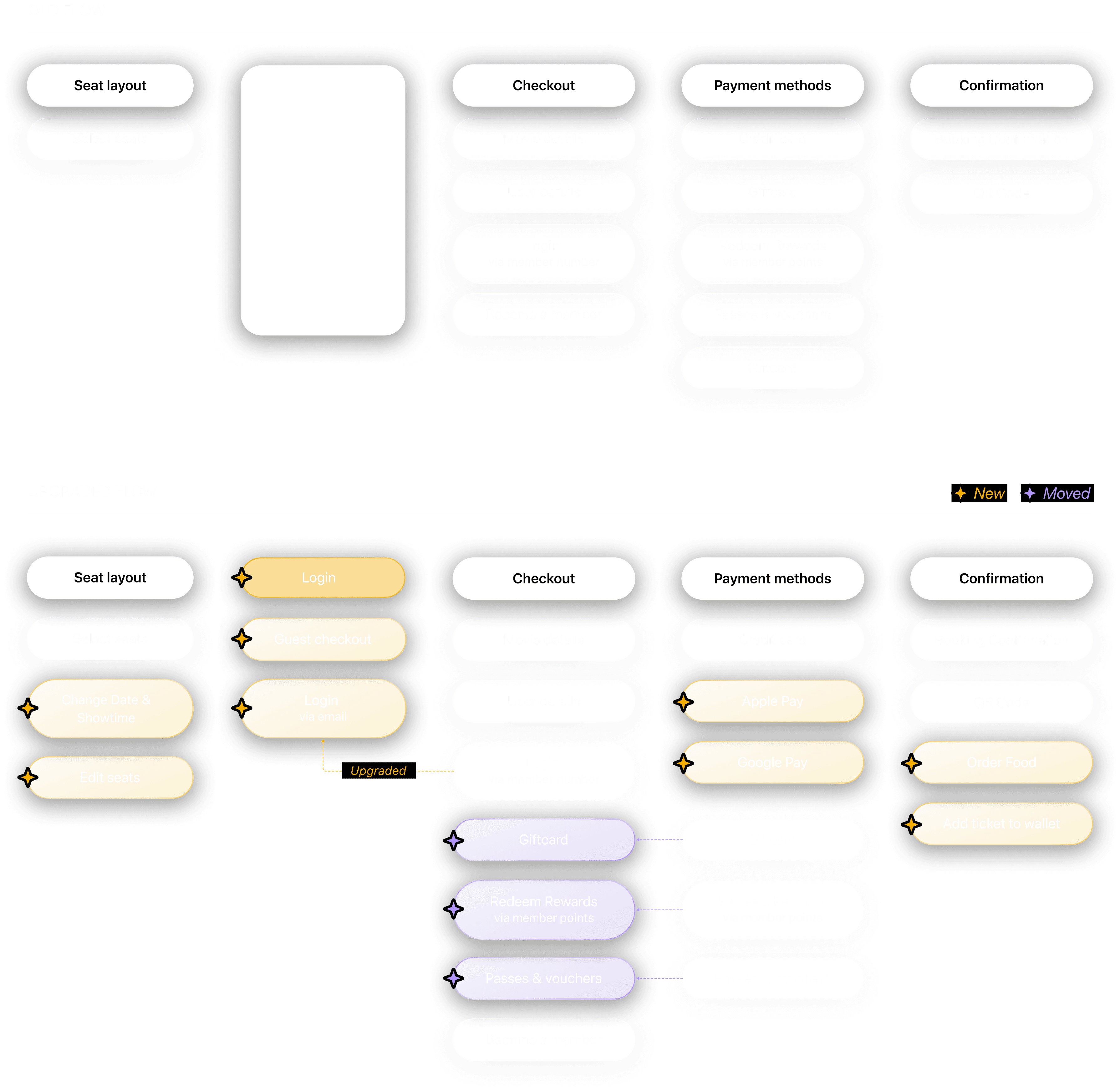
Updating the flow
Updating the flow
Updating the flow
Based on the identified insights, the user flow was updated to support the new changes and integrations.
Based on the identified insights, the user flow was updated to support the new changes and integrations.
Visual Design Decisions
Visual Design Decisions
Visual Design Decisions
STEP 1/5
Seat Layout
IMPACT
OCT ‘25 - jan '26
27.8%
Drop in order cancellations*
*Due to booking the wrong theatre
55.4%
Reduction in Exit rate
From 28.5% → 12.7%, after redesign
Problems
1.
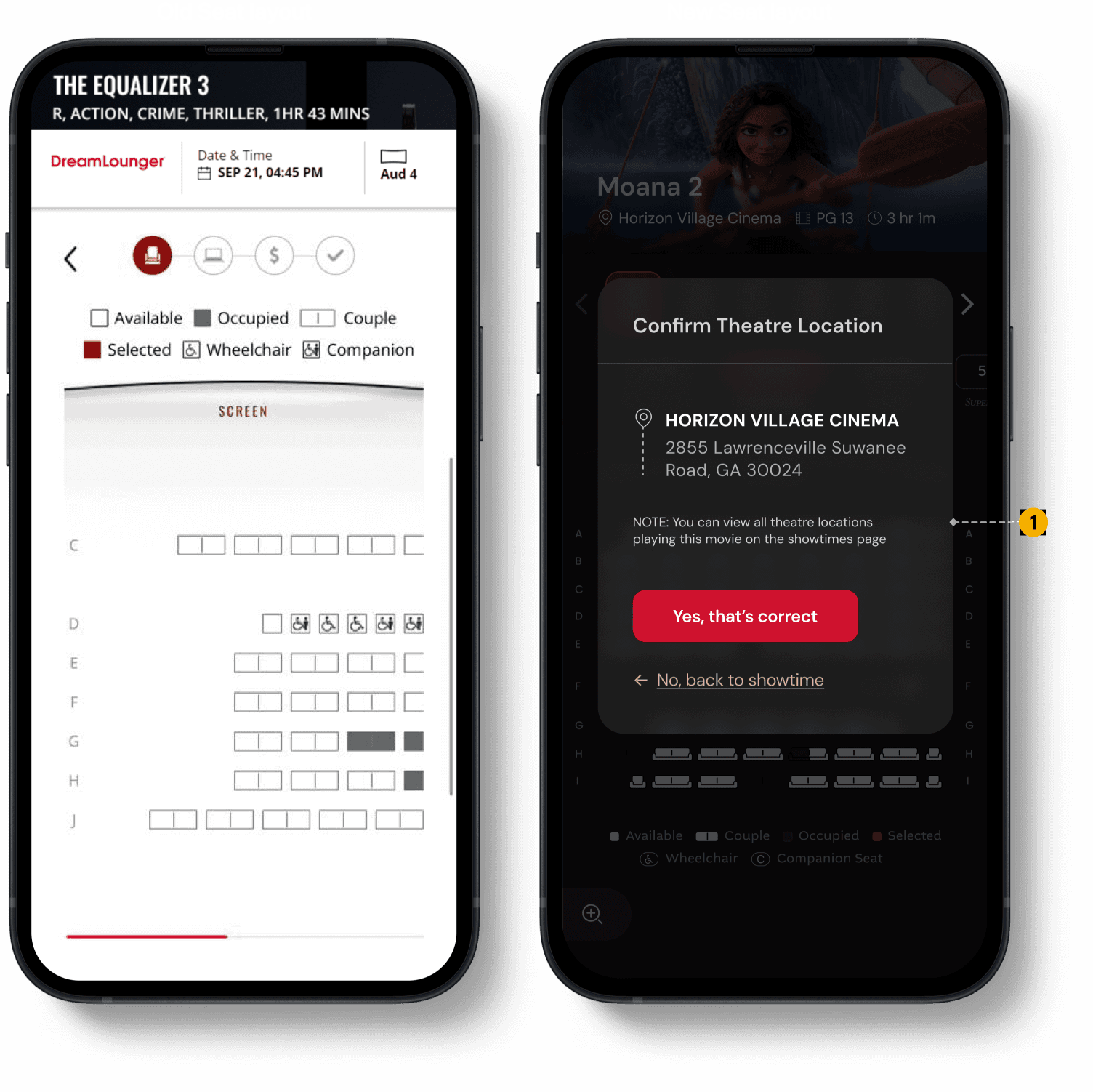
Users were showing up at the wrong location
Most users compare & select their showtimes from google search result and land on the seat layout directly (which did not have the location name specified)
Confirm Theatre Location
If users arrive from a third-party site, they’re prompted to confirm the theatre location before viewing the seat layout.
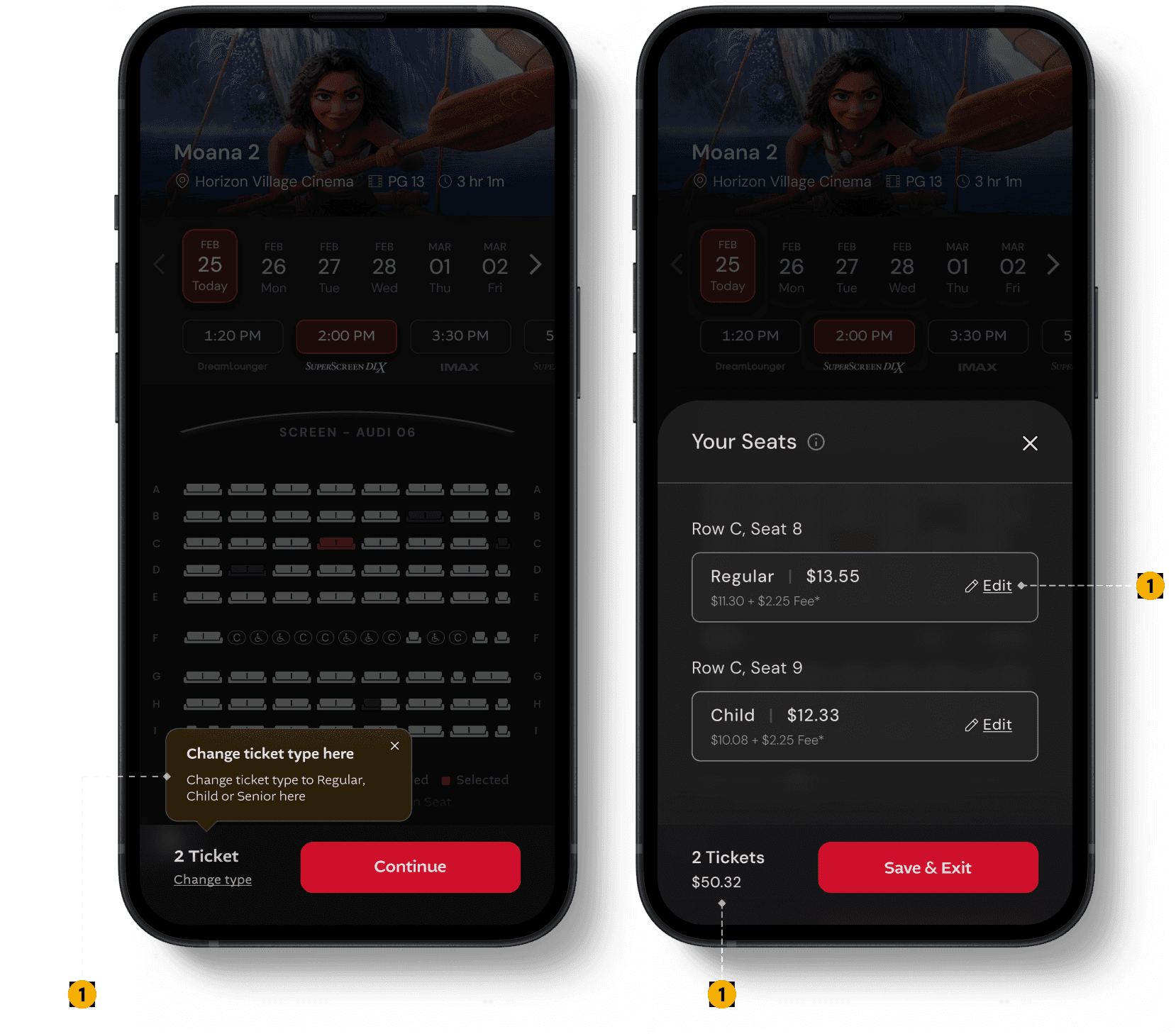
Edit tickets
Users can change ticket types directly from the drawer.
Problems
1.
No Ticket Review or Easy Edits
There was no way for users to review all selected tickets, and changing a ticket type required unselecting and reselecting seats.
Solution
Ticket count & total cost
Users can see the number of tickets selected and the total cost upfront.
Feature discovery via tooltips
Temporary tooltips guide users and highlight the new ticket-editing feature.
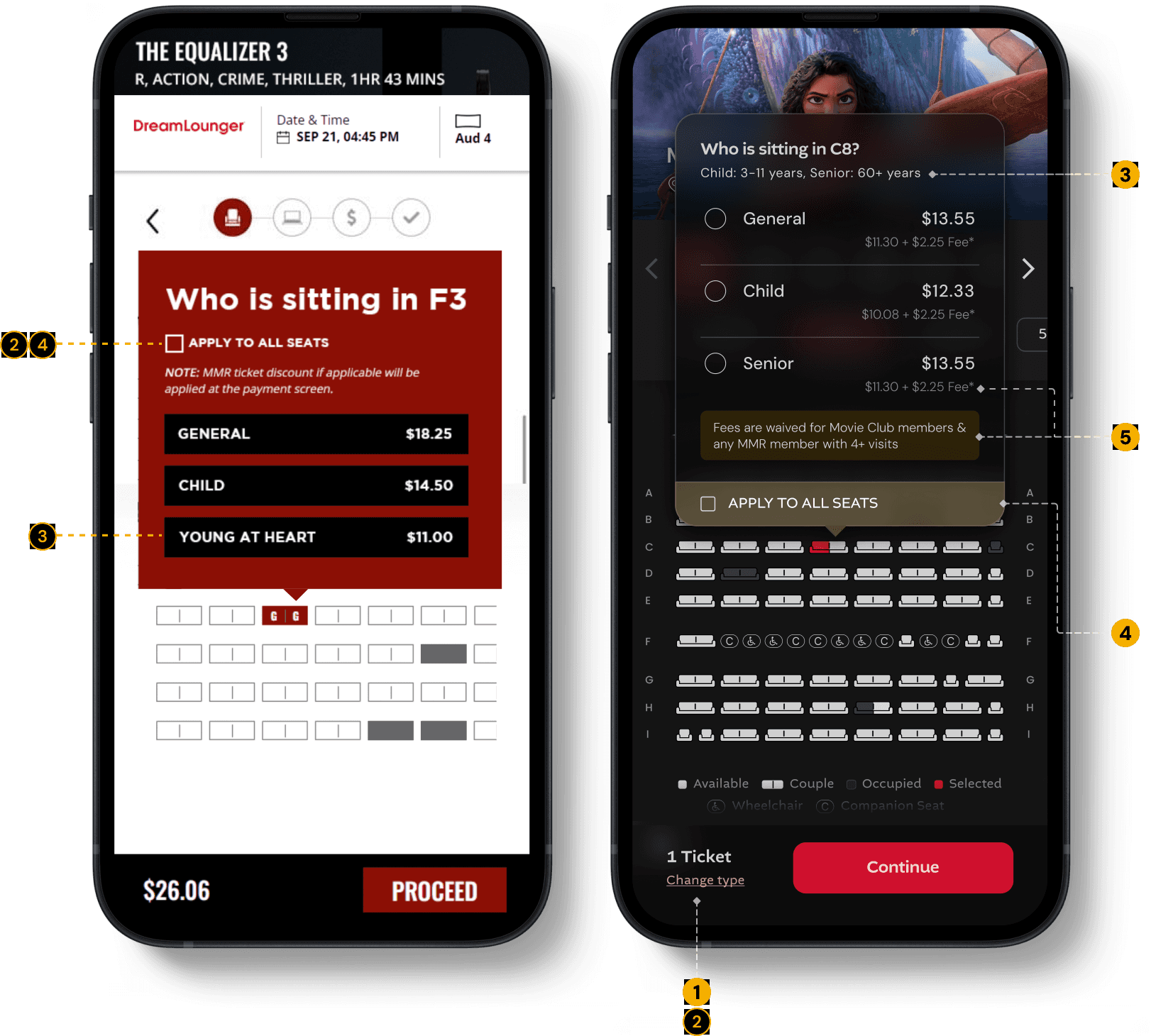
Fee transparency
& Waiver condition
Clear messaging reassures members that convenience fee is waived for them
Defined Age Groups
Clear range of age groups mentioned for special ticket types

A new US regulation requires cinemas to show convenience fees upfront, along with the ticket price. Previously, this fee appeared only at checkout. At Marcus Theatres, only non-members have to pay this fee.
Problems
1.
No direct way to edit ticket types
To change a ticket type, users had to unselect and reselect their seats.
3.
Unclear age ranges for ticket types
Users couldn’t easily understand which age group each ticket type applied to.
2.
“Apply to all” was hard to undo
Once enabled, users had no clear way to revert it. Users had to trial-and-error by unselecting & reselecting seats just to reopen the ticket selection modal.
4.
Low visibility of “Apply to all”
The feature wasn’t highlighted enough, despite it’s significance in reducing interaction cost (of repeat actions and effort)
Solution
Reduced Friction in Ticket Editing
Previously, users had to unselect and reselect seats to change ticket types. Now, they can edit tickets directly.
Change Date & Showtime
Users can browse and switch dates & showtimes across different experience formats, such as IMAX and 4DX.
Theatre Name Specified
Zoomed-Out Seat Layout
Viewing the full seat layout at a zoomed-out level helps users quickly decide where they want to sit in the theatre.
Problems
1.
Missing theatre name
The seat selection page didn’t show which theatre the user was booking for, leading to accidental bookings for the wrong location.
3.
Row numbers disappeared while scrolling
When users scrolled the seat layout, row labels got hidden, making seat selection harder and more error-prone.
2.
No quick way to switch showtimes
If preferred seats were sold out, users couldn’t change the date or showtime from the seat map and had to go back to the showtimes page.
2
STEP 2/5
Login
NEW PAGE
IMPACT
SEP - DEC ‘25
47.3%
Login
adoption rate
Problems
1.
Rewards Redemption Required 14-digit Number
The only way to redeem rewards was by entering a 14-digit member number. Since the system didn’t save this information, users had to re-enter it for every booking.
2.
No Login + Auto-Filling details
Users couldn’t log in and had to enter all their details manually every time.
Member Number Hard to Recall
Redeeming rewards required a 14-digit member number, which most users don’t remember or keep handy.
Email Login & Member Details Auto-Fetched
Users can now log in using their email and a one-time code to fetch all their details:
Member Details
Redeem Rewards
Gift cards
Saved payment methods
STEP 3/5
Checkout
IMPACT
SEP - DEC ‘25
31.3%
Time on Task (on this page)
From 1m 07s → 46s, after redesign
Problems
1.
Users Skipping Date & Time Check
Users often booked the wrong date and time because it wasn’t clearly highlighted and got overlooked while entering other details.
2.
Can’t review / edit tickets
Users couldn’t review or edit their selected tickets.
3
Secondary Payment Methods: Reward points, gift cards, passes & vouchers were moved from the payment page to the checkout page in redesign to keep payment step more focused and distraction-free.
Old Payment page
Moved to Checkout to Simplify Payment
Reward redemption
Gift cards
Passes & Vouchers
All secondary payment methods were moved from the payment page to the checkout page due to integration limitations, while also keeping the payment step more focused and distraction-free.
Quick Showtime Confirmation
Date and time are clearly shown below the movie details, for users to quickly confirm them without going back in the flow. This reduces stress and last-minute panic.
Flexible Ticket Editing
Users can edit ticket types at this step if they made an error. A clear ticket breakdown with an edit option next to each ticket type lets them make changes without returning to the seat layout.
STEP 4/5
Payment
IMPACT
SEP ‘25 - JAN ‘26
63.2%
Time on Task (on this page)
From 1m 46s → 39s, after redesign
61.3%
Reduction in Drop-off rate
From 16.8% → 6.5%, after redesign
Problems
NEW INTEGRATIONS
1.
Rewards-First Payment Flow Increased Drop-Offs
Keeping rewards redemption as the primary payment method caused drop-offs because users had to enter a 14-digit member number if they hadn’t done it earlier, while card payments were kept as a secondary option.
2.
Apple Pay & Google Pay
New payment modes were added during the revamp
Secondary Payment Methods: Reward points, gift cards, passes & vouchers were moved from the payment page to the checkout page in redesign to keep payment step more focused and distraction-free.
Added Faster Payments: Apple Pay & Google Pay
Introduced Apple Pay for iOS and Google Pay for Android to enable quicker, smoother checkout.
Simplified Payment Step
Reduced distractions by moving rewards, gift cards, and vouchers to the checkout step, keeping payment selection straightforward.
STEP 5/5
Confirmation
IMPACT
OCT - DEC ‘25
35.2%
Add to wallet
adoption rate
6x
Increase in f&b items ordered
Problems
NEW INTEGRATIONS
1.
Increased Fraud: Misuse of Discounted Ticket Types
Users were selecting discounted ticket types (Child/Senior) to pay less, leading to a rise in misuse. Theatre managers also had no quick way to identify bookings with special tickets for verification.
2.
Confirmation Page Was Hard to Scan
The booking confirmation page lacked clear structure, making key details difficult to find. Important elements like the QR code were pushed to the bottom of the page.
3.
Pre-Order Food
A new feature lets users order food in advance directly from the confirmation page.
4.
Add to Apple Wallet
Users can now add their tickets to Apple Wallet for quick access.
Colour-coded strip for different ticket types
A thin colour strip was added to each ticket to quickly indicate the ticket type, helping theatre managers identify special tickets at a glance.
Colour code for tickets:
Child / Senior
General
QR Code Now Visible Upfront
The QR code was moved to the top of the page so users can quickly access it for scanning at the theatre.
Prompting users to
pre-order food
Added CTA on confirmation page to drive advance food orders.
Quick access to ticket
Users can now add their tickets to Apple Wallet for quick access.

IMPACT
IMPACT
Metrics improved
Metrics improved
Metrics improved
Based on three months of data collected between Sep–Dec 2025.
Based on three months of data collected between Sep–Dec 2025.
61.3%
61.3%
61.3%
Reduction in
payment drop-offs
Reduction in
payment drop-offs
Reduction in
payment drop-offs
$544K
$544K
$544K
Increase in additional monthly revenue
Increase in additional
monthly revenue
Increase in additional monthly revenue
14%
Improvement in cart conversion rate
35.2%
35.2%
35.2%
Reduction in overall time on task (∼1m 21s)
Reduction in overall
time on task (∼1m 21s)
Reduction in overall time on task (∼1m 21s)
14%
14%
Increase in cart conversion rate
Reduction in overall
time on task (∼1m 21s)
27.8%
27.8%
Reduction in order cancellations
Reduction in overall
time on task (∼1m 21s)
6x
6x
Increase in f&b items ordered via upsell
Increase in f&b items
ordered via upsell
LEARNINGS
LEARNINGS
Reflection
Reflection
Reflection
WHAT WAS MISSED
WHAT WAS MISSED
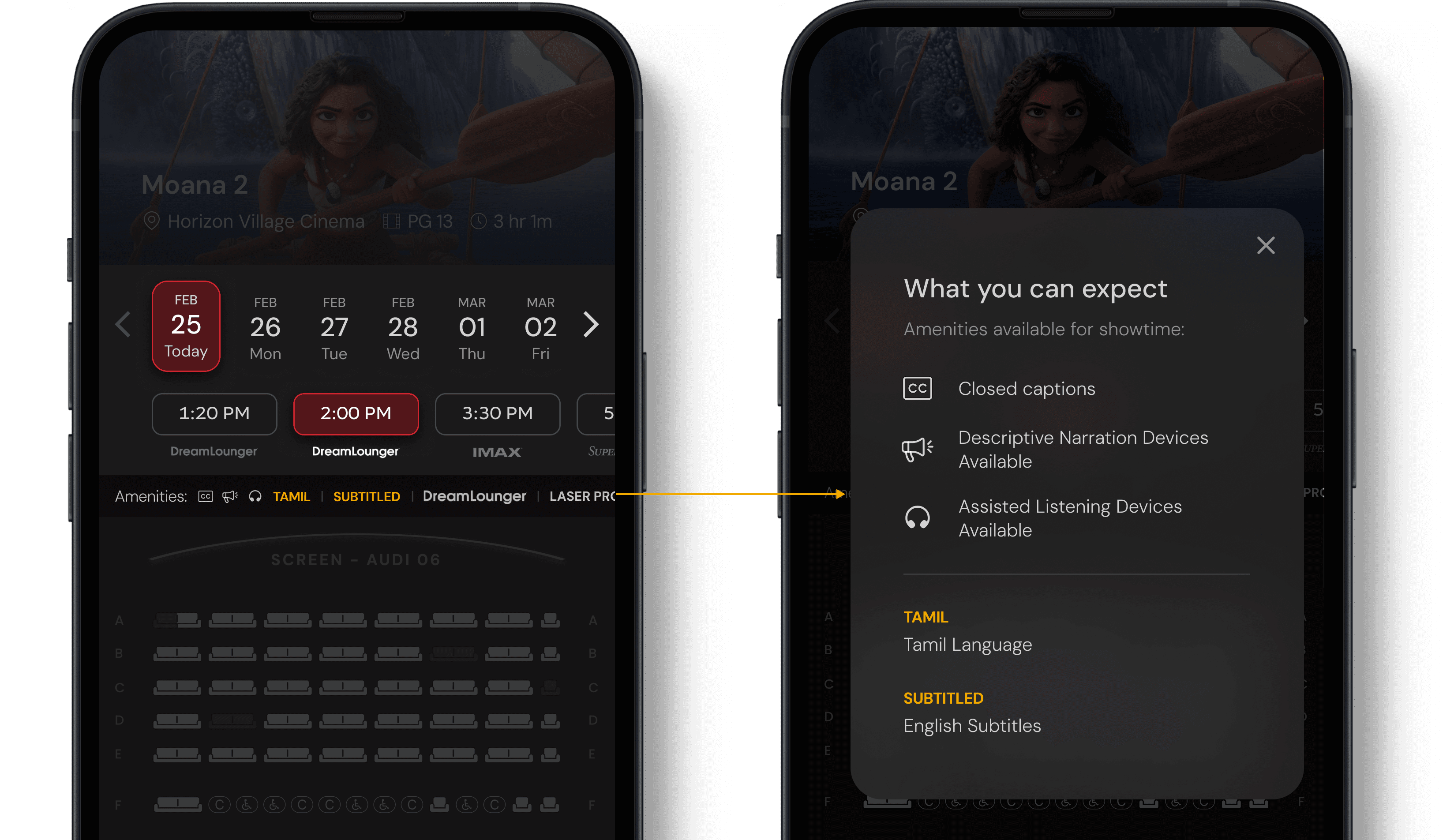
Accessibility Amenities Not Visible During Seat Selection
Accessibility missing at seat layout
Although accessibility amenities were shown on the showtimes page (and vary by showtime), they weren’t mentioned on the seat selection page. Adding them here helps users quickly confirm the right setup before choosing seats, especially for users who rely on specific accessibility features & arrive from third-party site to seat map directly.
Although accessibility amenities were shown on the showtimes page (and vary by showtime), they weren’t mentioned on the seat selection page. Adding them here helps users quickly confirm the right setup before choosing seats, especially for users who rely on specific accessibility features & arrive from third-party site to seat map directly.
Google search result
Reflections
What I’d improve today
While writing this case study, I also wanted to highlight a few ideas that couldn’t be explored earlier due to time or technical constraints. They remain strong opportunities that can build on the existing design.
Change theatre
Age Verification Alert
Accessibility Amenities
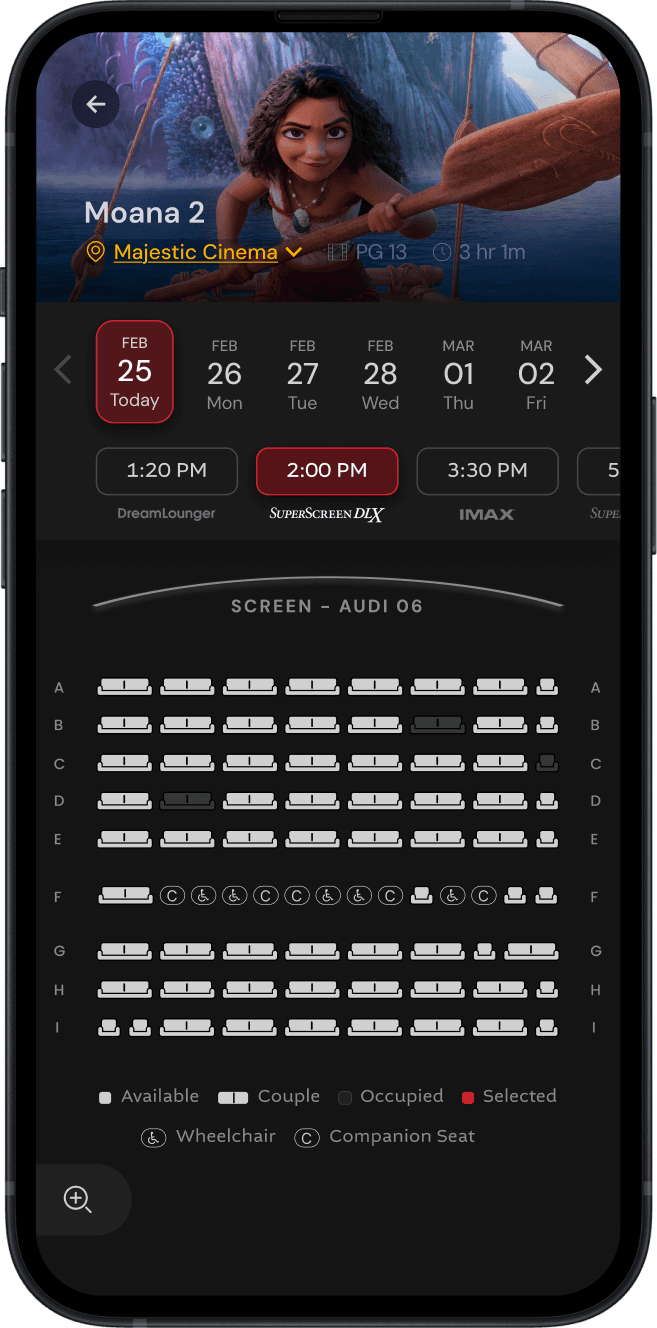
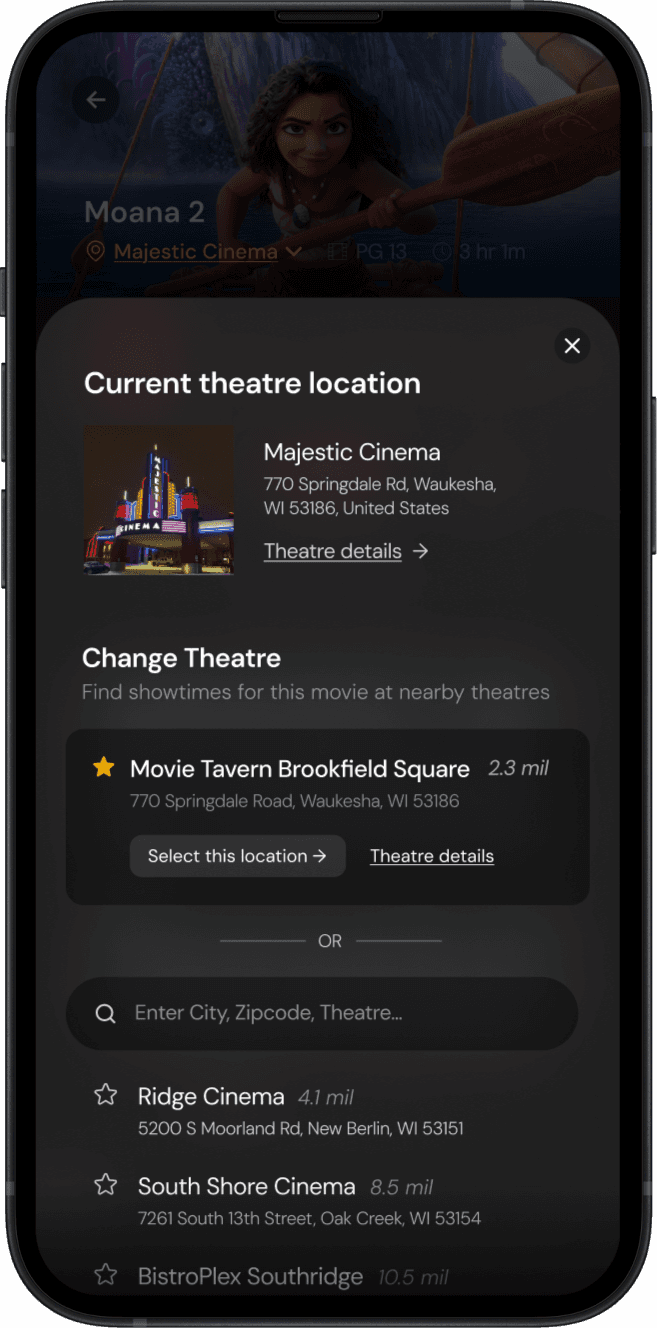

Allows users to quickly change theatre & find showtimes for the movie without leaving the seatmap
Favourite theatres
Constraint:
Login details from the main website aren’t currently carried into the ticketing microsite.
Future opportunity:
Once integrated, users could see their favourited theatres here, making it easier to switch locations and find the right showtime quickly.
MY TAKEAWAYS
MY TAKEAWAYS
What I learnt from this project
What I learnt from this project
This was the first large-scale project I led, and it pushed me to run client meetings and weekly stakeholder reviews with teams across different functions.
This was the first large-scale project I led, and it pushed me to run client meetings and weekly stakeholder reviews with teams across different functions.
Communicating with stakeholders effectively
Communicating with stakeholders effectively
I learned to understand what each stakeholder cared about, tailor my communication to their priorities, and keep everyone aligned.
I learned to understand what each stakeholder cared about, tailor my communication to their priorities, and keep everyone aligned.
Presenting and defending design decisions
Presenting and defending design decisions
I learned to confidently explain my design choices with clear reasoning and expected impact, while also steering conversations back on track when discussions drifted.
I learned to confidently explain my design choices with clear reasoning and expected impact, while also steering conversations back on track when discussions drifted.
One resource that helped me the most was Articulating Design Decisions. I’d recommend it to any designer who’s actively working on communicating & building stronger relationships with stakeholders.
My Bedside book during this project
One resource that helped me the most was Articulating Design Decisions.
I’d recommend it to any designer who’s actively working on communicating & building stronger relationships with stakeholders.
BONUS
Desktop design
BONUS SECTION
Ticketing experience on desktop
Although only 15% of users book tickets on desktop, we still put significant effort into making the experience fully responsive. Below is a demo video of the desktop ticketing flow.
CHECK OUT OTHER PROJECTS
Salad
Salads
Cobb Salad
Side Salad 1 ea
Salad Toppings
Sub Side Salad
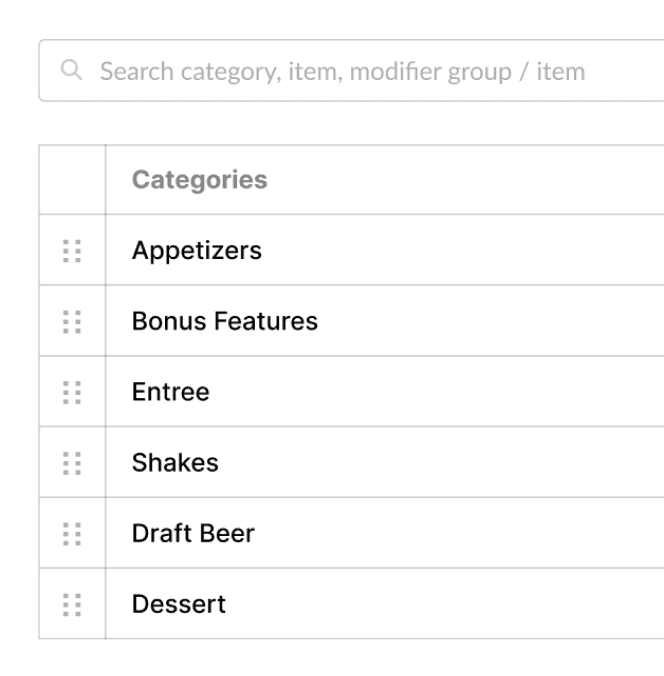
Category
Item
Modifier Group
Modifier Item
Filter:

Category
Modifier Item

Modifier Group
ADMIN DASHBOARD
•
SaaS
Reduced overall time at task (TAT) by 76.5%
When a theatre location manager needed to disable a specific menu item, they had to submit a service request each time.
With over 800 data points stored in a JSON file, the IT team faced the daunting task of sifting through it all—like searching for a needle in a haystack.

Atishya Gupta
Atishya Gupta

UX Designer
UX Designer
© Jan 2026, Atishya Gupta
© Jan 2026, Atishya Gupta
Designed with love and countless cups of coffee :)
Designed with love and countless cups of coffee :)
SOCIALS